
Inspiring
May 17, 2023 8:32 PM UTC
Answered

Any idea why I can drag the left arm but not the right one?

I currently have a character with the left arm draggable when I record:
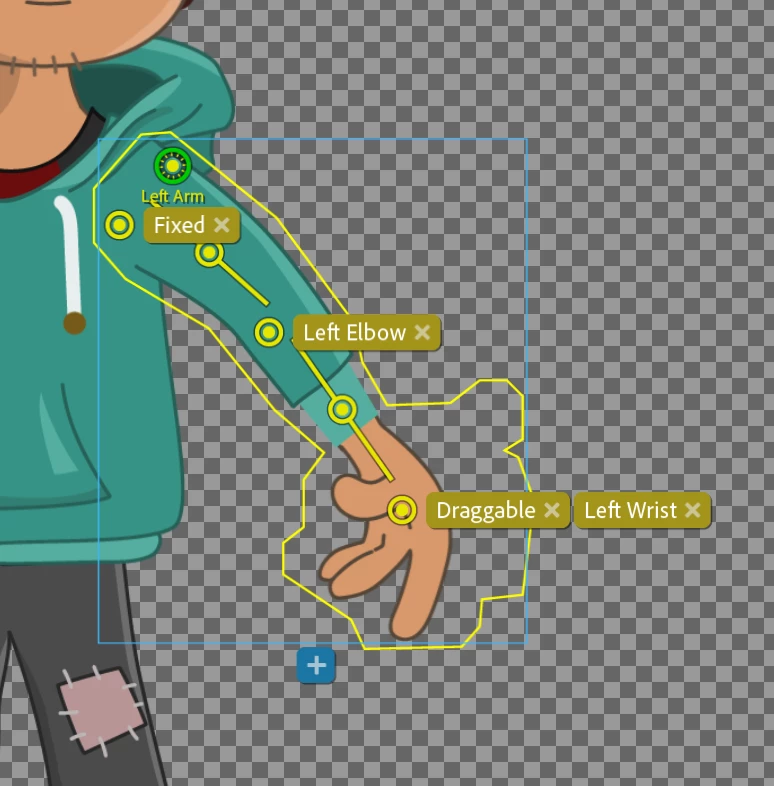
On the left wrist is the draggable, I simply pull with my mouse and it works.

However on the right side which is almost identical:

 When I drag this in the same way then it doesn't work.

Both layers have the crown associated:


 Any idea why I can't drag?

I'm attaching the character as a dropbox link also.

[link removed by moderator]
This topic is closed to new replies. Start a new post to keep the conversation going.
j-saitoCorrect answer
Adobe Employee
May 18, 2023 1:12 AM UTC

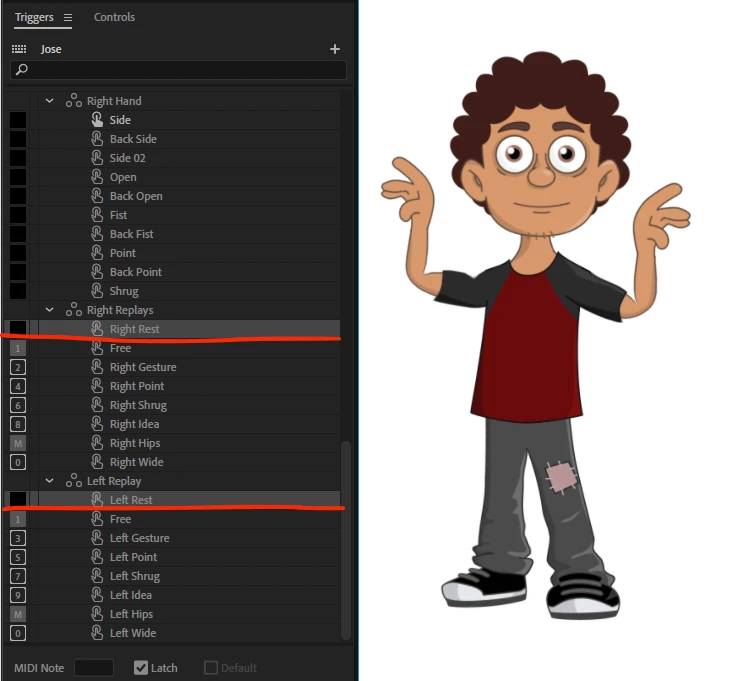
By default, this puppet has the Right Rest and Left Rest replays triggered.

These replays lock the arms to be in the "rest pose."

You need to re-trigger these to toggle them off, or trigger "Free" under "Right Rest" and "Left Rest" so you can freely drag them.


3 replies

ElectroPuppet
Inspiring
May 19, 2023 3:31 AM UTC

Hi OhmsG,

I created a tutorial on how to use the arms with the Toon Loon puppets here;
https://www.electropuppet.com/working-with-arms-in-adobe-character-animator/

Please remove your download link immediatley. Sharing our puppets is against our license agreement.


Translate
k_oshiro
Community Expert
Community Expert
May 18, 2023 1:25 AM UTC

Japanese was converted to English using translation software.
1) Add a crown mark.
2) Add a dragger behavior to that layer.


P.S.The article and the puppet link have been removed because it appeared to be a copyrighted puppet.


Translate
k_oshiro(AdobeCommunityExpert)
j-saitoCorrect answer
Adobe Employee
May 18, 2023 1:12 AM UTC

By default, this puppet has the Right Rest and Left Rest replays triggered.

These replays lock the arms to be in the "rest pose."

You need to re-trigger these to toggle them off, or trigger "Free" under "Right Rest" and "Left Rest" so you can freely drag them.


Translate