Participant
August 5, 2025
Answered

Anyone know a way to downsize your puppet in starter mode?

  • August 5, 2025
  • 2 replies
  • 372 views

I have rigged a nice large puppet in pro-mode (with all sorts of triggers and replays ready for use in starter-mode). I was thinking, that the character could just be rescaled in starter-mode.

But that is not possible…

Can I somehow resize the .puppet-file in pro-mode before importing into starter-mode?

Or any other tricks?

Thanks in advance
Correct answer k_oshiro

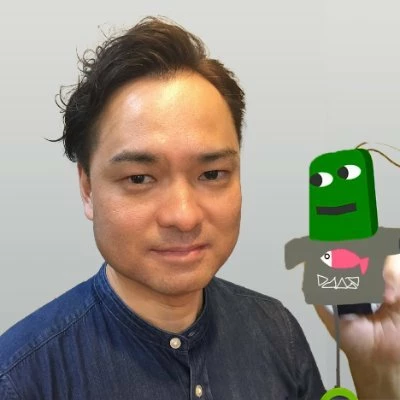
Load the puppet whose scale has been changed in Pro Mode into Starter Mode.

1) Change the scale value in Scene Transform.
2) Press the Puppet Track Behavior icon.
3) Check that the scale in Rig Mode is the same as the value changed in Scene.
4) Export the puppet.

5) Check the scale in Starter Mode.
Thank You

2 replies

k_oshiro
Community Expert
k_oshiroCommunity ExpertCorrect answer
Community Expert
August 8, 2025

Load the puppet whose scale has been changed in Pro Mode into Starter Mode.

1) Change the scale value in Scene Transform.
2) Press the Puppet Track Behavior icon.
3) Check that the scale in Rig Mode is the same as the value changed in Scene.
4) Export the puppet.

5) Check the scale in Starter Mode.
Thank You

k_oshiro(AdobeCommunityExpert)
TheOriginalGC
Community Expert
Community Expert
August 8, 2025

Thank you very much, k_oshiro!

TheOriginalGC
Community Expert
Community Expert
August 5, 2025

My first thought would be to use the Transform properties to scale the puppet to the size you want it to be and then export the result as a new puppet. I tried that with the Stardust puppet, but it imported into Starter at its default size. Re-sizing the original file would almost certainly require you to re-rig the puppet. I'll let you know if I think of anything.

Participant
August 6, 2025

Thanks - I tried the resizing in pro-mode and - as you say - it still imports into starter as default size. It would be great if I can avoid re-rigging the whole thing again - so yes, please - let me know if you have any other great ideas. 

And thank you for sharing your thoughts on the problem 🙂

TheOriginalGC
Community Expert
Community Expert
August 7, 2025

It's probably not the solution you're looking for (and I strongly recommend making a backup of your files and exporting the puppet), but if you edit the puppet from within Character Animator by right-clicking on the puppet file and selecting "edit original," you can open the file in either Photoshop or Illustrator (depending on the original file type) and scale the image there. When you return to Character Animator after saving your changes, you will be able to go back into the puppet rigging and move any nodes that are no longer aligned with the original art. You still have to do some work with the rigging, but maybe it will still save you some time.