
Are These... Groups and Layers?
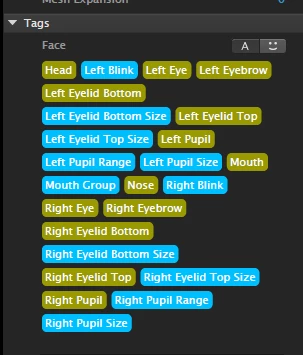
I'm starting working with Ch... making basic Face in Ps. Only creating Head an Eyes at the moment, so I can see how the intergration between Ps and Ch works and how Ch works with just the eyes.. Hopefully I'll get a better understanding of how Ch works this way and before I add further parts of the face.
I have a question;
In one of Dave's tutorials he mentions using the Tags in Ch as a cheat sheet for the Ps Layer and Group Names.. Good Idea!
I checked this out, but I noticed that they were different colours... I think this denotes Groups and Layers, but not sure.... I thought the Green could be Groups and the Blue Layers.... but then I saw... Mouth Group!? So can someone tell me what the colours refer too?
If they are Groups and Layers... a future idea could be having them as nested Groups and Layers to mimic the actual Layers Panel in Ch? This would help with forming a connection between the two? If that makes sense!?


 AdChoices