Jenterbz
Inspiring
April 26, 2019
Answered

Arm clipping into itself?

  • April 26, 2019
  • 2 replies
  • 385 views

Hi guys, I'm running into an issue where the arm goes over itself improperly. I can't always get the forearm to cover the upper arm, and there's also a weird visual thing going on (you can see triangular bits that look like the mesh).

Here's a video of what I'm referring to: Arm Clipping - YouTube

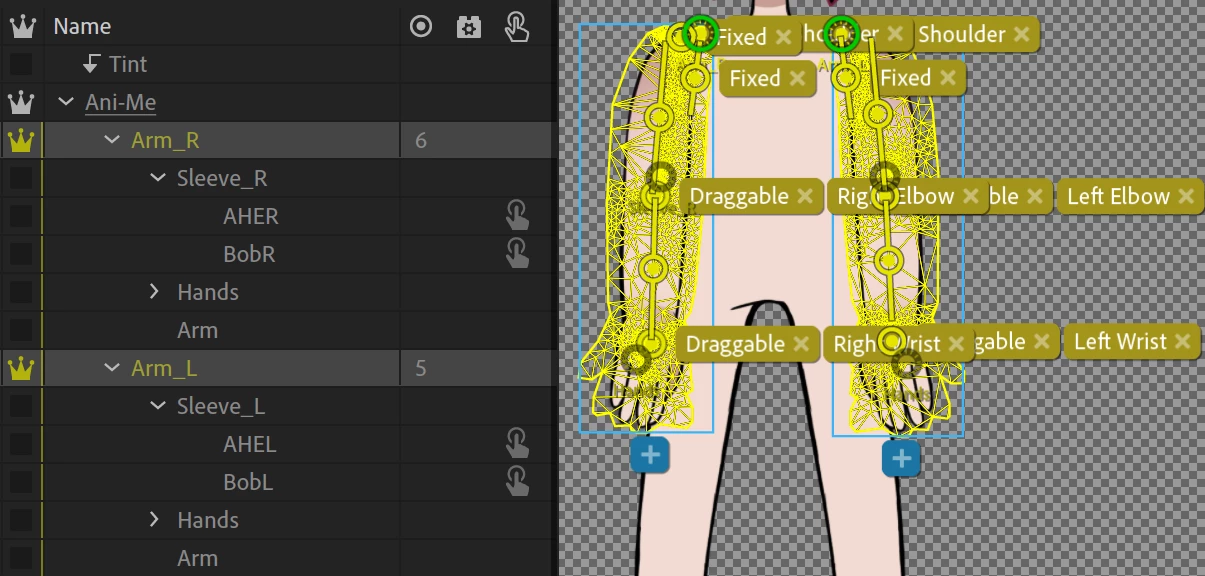
And here's how everything is structured:

Is there any way that I can eliminate this?

Should the forearm and upper arm be separate from each other, instead of on the same layer (the way it is now)?

Thanks in advance!

This topic is closed to new replies. Start a new post to keep the conversation going.
Correct answer alank99101739

Things are a bit funky when everything is in the one mesh. Using independence layers you can force what goes in front of what. So yes, creating a forearm separate to upper arm can help. But it might not be necessary if you want to experiment first. (It also can create other problems!)

What I think is happening is your artwork is an illustrator file with lots of different objects making up the arm. Things like the black line around the edge of the arm are long and extend from the upper arm down to the wrist. Then you have lots of other bits in between. You can try to reorder the objects in the arm artwork layer so the upper arm artwork is at the top and lower arm artwork is at the bottom. This may need you to cut the arm outlines (anything that is in both the upper and lower arm segments). Let’s pretend there is a single pink polygon for the skin and a single black line for the outline. If the outline is always in front, the upper arm outline will be in front of the pink skin always. (You cannot have one object that is sometimes in front of another, sometimes behind).

So yes, you are almost certainly going to need to adjust the artwork. Once you have cleaned it up (e.g. moved everything for the upper arm to one group and everything to the lower arm to another group, to guarantee no objects appear in both), you can order the lower arm obove the upper arm in the hierarchy so you control what is in front of what.

If that does not work (I am not 100% sure it will, but I think it will), then turn the lower arm into an independent layer.


2 replies

alank99101739
alank99101739Correct answer
Legend
April 26, 2019

Things are a bit funky when everything is in the one mesh. Using independence layers you can force what goes in front of what. So yes, creating a forearm separate to upper arm can help. But it might not be necessary if you want to experiment first. (It also can create other problems!)

What I think is happening is your artwork is an illustrator file with lots of different objects making up the arm. Things like the black line around the edge of the arm are long and extend from the upper arm down to the wrist. Then you have lots of other bits in between. You can try to reorder the objects in the arm artwork layer so the upper arm artwork is at the top and lower arm artwork is at the bottom. This may need you to cut the arm outlines (anything that is in both the upper and lower arm segments). Let’s pretend there is a single pink polygon for the skin and a single black line for the outline. If the outline is always in front, the upper arm outline will be in front of the pink skin always. (You cannot have one object that is sometimes in front of another, sometimes behind).

So yes, you are almost certainly going to need to adjust the artwork. Once you have cleaned it up (e.g. moved everything for the upper arm to one group and everything to the lower arm to another group, to guarantee no objects appear in both), you can order the lower arm obove the upper arm in the hierarchy so you control what is in front of what.

If that does not work (I am not 100% sure it will, but I think it will), then turn the lower arm into an independent layer.

Jenterbz
JenterbzAuthor
Inspiring
April 27, 2019

I separated the arm artwork into "upper arm" and "lower arm" groups, and now it's working beautifully!

Thanks so much.