Martinnel
Inspiring
November 18, 2018
Answered

Arm Distortion While Walking

  • November 18, 2018
  • 2 replies
  • 1800 views

There is always one thing or another to trip me up while rigging.

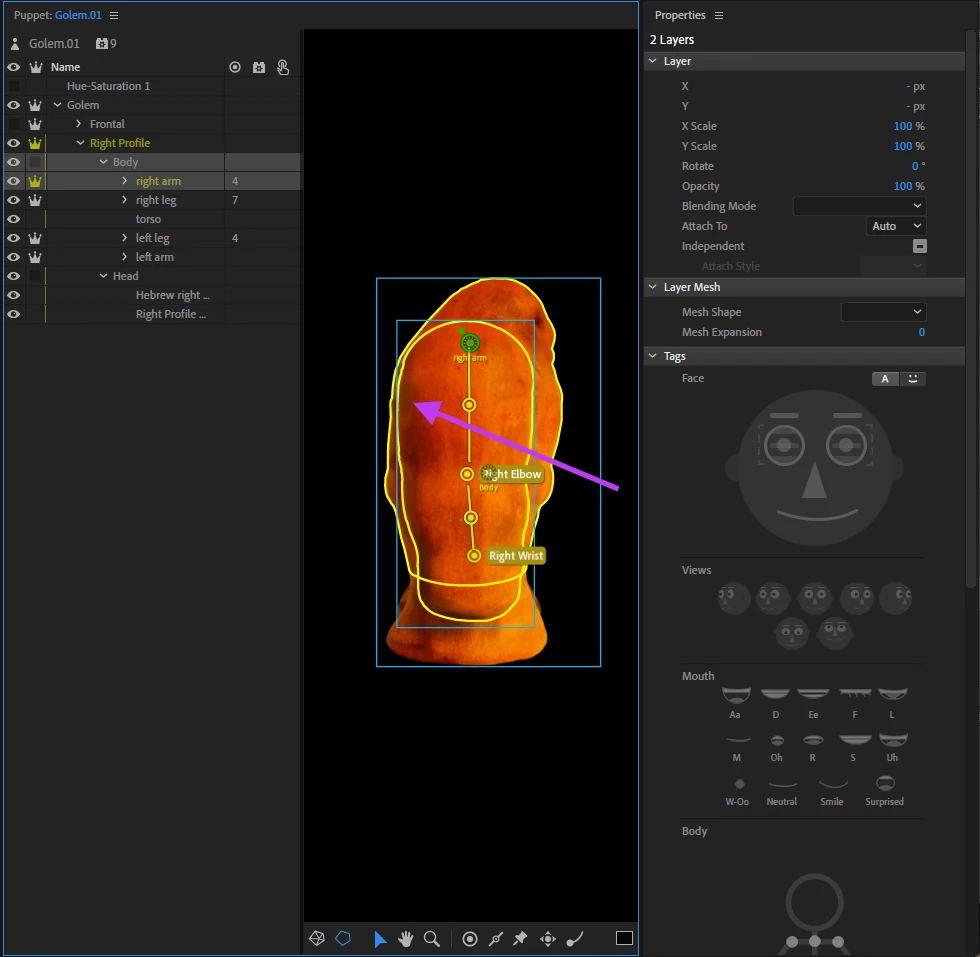
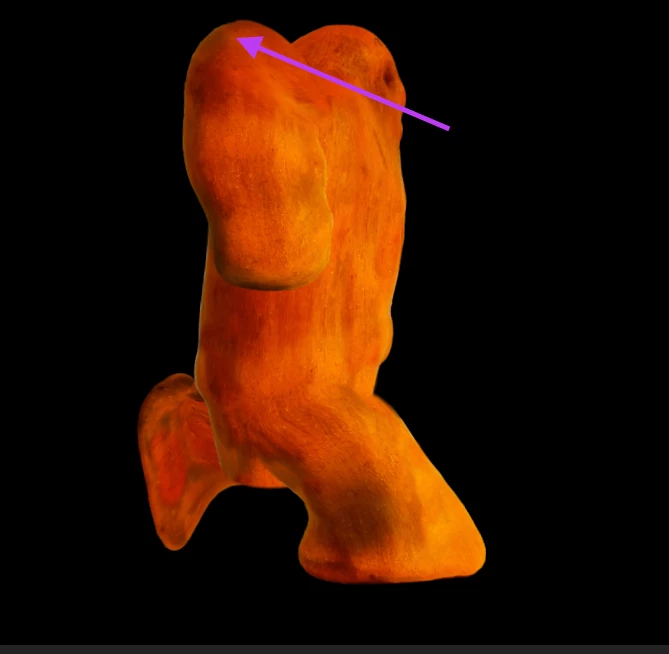
I'm trying to teach my puppet to walk. I've been working from Okay Samurai's excellent new Walking tutorial. I've got all the Walk Properties set to default, but for some reason, the arms tend to distort upward as if my puppet's angrily walking with his elbows up — see pic. NOTE: the uppermost part of the arm in the first image is not the top part of the arm. It corresponds the the purple arrow in the second image. The arm is distorting rather than simply rising up too high.

Any idea what I'm doing wrong? Happy to provide additional images.

Martin
    This topic has been closed for replies.
    Correct answer Martinnel

    alank99101739  wrote

    Sharing an animated gif can help as well - it can make it easier to work out what is happening.

    Attached. (Took me a while because with the current versions—Ch, v. 2.0, Media Encoder, v. 13.01, Mac OS 10.12.6—Encoder would not directly produce a GIF. I had to produce an mp4 and then put that into Encoder to make the GIF. Ah well, done now)

    alank99101739  wrote

    Or share a puppet (you can replace the artwork with rectangles if its copyright etc).

    I'd be happy to share with you directly Alan, but I'm hesitant to post it in so public a forum. Plus, I don't know the size limits here.

    Martin


    Yay, I seem to have fixed the problem. I was, as I mentioned above, following Okay Samurai's excellent new Walking tutorial. Foolishly perhaps, I was making his suggested changes as I went along. At around 4:30, Dave says to move the character's main origin and then top character group origin down to the feet. When I did this it shoved the character off the top of the screen. I then adjusted his position to get him back on the screen and that distorted everything. Putting those origins back in the middle of his torso seemed to address this problem.

    Now on to the next.

    Martin

    2 replies

    SharonfromMD
    Inspiring
    November 18, 2018

    All I can do is emphasize. I've been dealing with this for months. In fact, I just spent the better part of three days dealing with it with a normal looking character. I tried using putting more dragger points in the wrist, elbow, etc. I sort of got mine to work by giving up and having him raise his arms.

    Bottom line-this is a known problem in a very new program. I'm disappointed it hasn't been fixed yet. Your two pictures don't look that bad to me. In an animation, it goes by quickly.

    -Sharon Cheek

    Martinnel
    MartinnelAuthor
    Inspiring
    November 18, 2018

    Thanks Sharon. One of the challenges with new, complex software is it's hard to know whether it's you or the program that's messing up. I feel a little more competent with the possibility it isn't me.

    Still, I'm determined to get this to work. I wonder if the problem lies in my puppet's head being so embedded in its torso.

    Martin

    alank99101739
    Legend
    November 18, 2018

    Sometimes things like the position of neck head, and waist tags impact the result as well. The other thing to try is turning on the yellow mesh icon (bottom left corner) to see if there is a part that is clearly not moving - sometimes that identifies the specific handle playing up.

    alank99101739
    Legend
    November 18, 2018

    Sharing an animated gif can help as well - it can make it easier to work out what is happening. Or share a puppet (you can replace the artwork with rectangles if its copyright etc).

    Martinnel
    MartinnelAuthor
    Inspiring
    November 18, 2018

    alank99101739  wrote

    Sharing an animated gif can help as well - it can make it easier to work out what is happening.

    Attached. (Took me a while because with the current versions—Ch, v. 2.0, Media Encoder, v. 13.01, Mac OS 10.12.6—Encoder would not directly produce a GIF. I had to produce an mp4 and then put that into Encoder to make the GIF. Ah well, done now)

    alank99101739  wrote

    Or share a puppet (you can replace the artwork with rectangles if its copyright etc).

    I'd be happy to share with you directly Alan, but I'm hesitant to post it in so public a forum. Plus, I don't know the size limits here.

    Martin