IanD101
Inspiring
April 22, 2018
Answered

Arm floating after iMac froze

  • April 22, 2018
  • 11 replies
  • 1079 views

Hi all I hope you can help.

My iMac froze in the middle of my project so I had to manually shut down the computer. When it rebooted my puppet was corrupted and one of the arm became disconnected to the body.

I tried fixing only to make the whole project obsollete. Lucky I saved the puppet from the crash and started over. I only wish I saved the original puppet 1st.

Heres a link to my puppet if anyone can find the solution.

I just want to say thanks to a fantastic community, I thought I was alone and forums were only for discussion and not physical help.    

https://drive.google.com/open?id=1q_Ua20YN5H-irgp7J1RnCYB7zD2gE7UJ

    This topic is closed to new replies. Start a new post to keep the conversation going.
    Correct answer IanD101

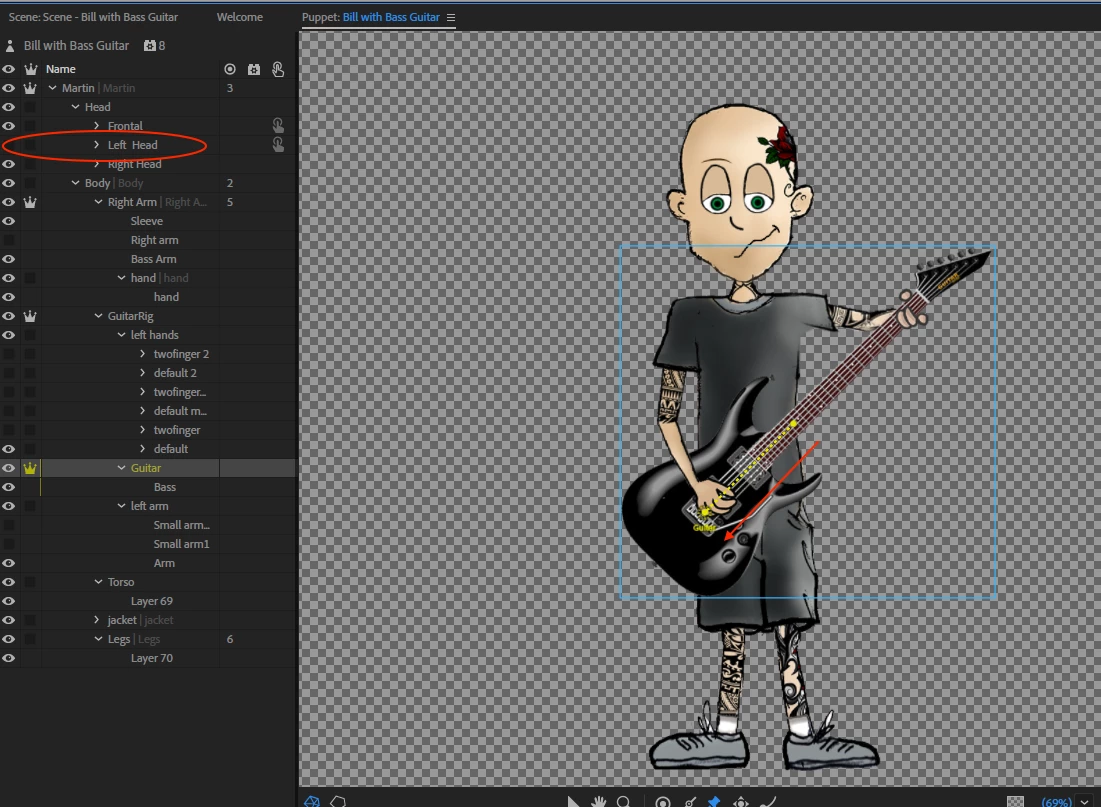
    Ah! Silly me! The nesting of independent layers (as I said above) won’t work. Pins can pin a layer to the parent. So the way Martin works is the +Guitar layer has pins pinning it to the parent Independence group. In your case, right arm is independent to the body, so +Guitar can only pin things to +Right Arm.  If you remove independence from Right Arm, then the +Guitar can attach to the body (the shoulder in particular) via pins.  That is, after fixing the children of +Guitar (your puppet has moved something deeper than Martin has in the PSD file), then remove independence from Right Arm, and it started working for me.


    Thanks for staying up late to figure stuff out for me. I tried your suggested methods which indeed did latch the arm to the body. However, the behaviour of my puppet wasn't the same.

    Good news I figured it out by moving the Guitar pin backwards & parallel to the stem of the guitar (now I remember I did that on the original before the crash). I also fixed the head by removing the + from +Right Head which was conflicting.

    Yes, the hierarchy is intentionally different to Martin so that the puppet looks more realistic when play the guitar. Take a look at the updated puppet and see how it correctly works like it did originally.

    I do need help to make the fingers switch between Default & Twofinger simultaneously with the arm movement. I have latched all 3 arms so that I have time to move the fingers. Character Animation
    Hopefully this might help more people struggling with this puppet template.

    Thanks for always being there!

    Cheers,

    Ian

    11 replies

    SharonfromMD
    Inspiring
    April 25, 2018

    I'm a beginner, so take this with a critical mind. My MAC froze a few days ago and it looked like I lost my entire animation. There was nothing in the Timeline or in the scene. However, there was a history and project. I restarted the computer-nothing changed.

    Then I just tried clicking on the second from the last thing in the timeline-low and behold!!! The entire project came back up.

    Just an idea. There was a record of the file. It just had to be activated. Good luck.

    IanD101
    IanD101Author
    Inspiring
    April 23, 2018

    UPDATE: Here is a more recent link.

    Character Animation - Google Drive

    Screenshot

    alank99101739
    Legend
    April 23, 2018

    You have +Right Arm, and nested in it +Guitar Rig, and nested in that is Left Arm (the one that floats). So you have said the left arm is a part of the guitar, which is an independent group, and so its not attached at the shoulder to your puppet. I thought a pin would hold a position relative to the parent layer, but that did not work for me. (I thought that is how Martin did it too.) That needs a better expert than I am. I don't know how to get two arms attached to shoulders and the guitar.

    Note: your hierarchy is a bit different to Martin. Is that difference intentional? The nesting around the guitar is a little different. Martin seems to work as I would expect with pins to connect the arm to the shoulder, but I failed to get your puppet going sorry (and I need to get to bed) - even after I tried to fix the nesting problem.  I would check the nesting of your puppet compared to Martin.

    But I think you need to put some pins to connect the left arm to the shoulder. (But when I tried it did not work - but it does seem to work in Martin.)

    alank99101739
    Legend
    April 23, 2018

    Ah! Silly me! The nesting of independent layers (as I said above) won’t work. Pins can pin a layer to the parent. So the way Martin works is the +Guitar layer has pins pinning it to the parent Independence group. In your case, right arm is independent to the body, so +Guitar can only pin things to +Right Arm.  If you remove independence from Right Arm, then the +Guitar can attach to the body (the shoulder in particular) via pins.  That is, after fixing the children of +Guitar (your puppet has moved something deeper than Martin has in the PSD file), then remove independence from Right Arm, and it started working for me.

