Inspiring
April 5, 2022
Answered

Attach Walk Style to Puppet, Not Scene

  • April 5, 2022
  • 1 reply
  • 330 views

Hi everyone,

I've noticed that after I play around with a character's walk style and get it how I'd like, it resets to the default with every new scene. It's not critical, but I'd love to save myself the extra work. Is there any way to attach the walk style to the puppet's default, and then still have the option to change it in a single scene if need be?

Thanks!
This topic has been closed for replies.
Correct answer David Arbor

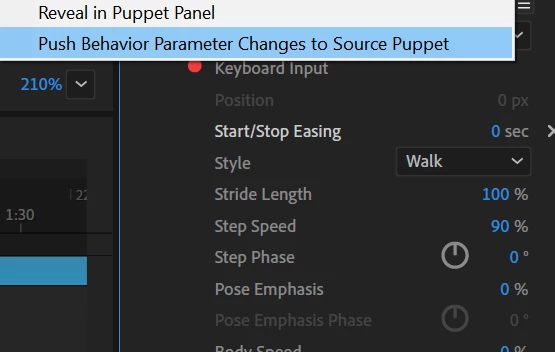
Yes! There's a great feature that applies to all behaviors, not just the Walk one to push your changes to the Puppet. Click the Hamburger Menu at the top of the behavior and select "Push Behavior Parameter Changes to Source Puppet."


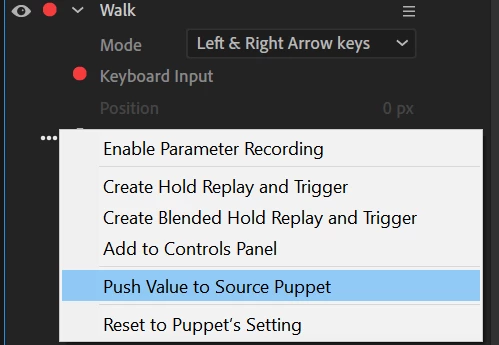
You can even do this on a more granular basis if you want some, but not all parameters pushed to your puppet by selecting the three dots to the left of a parameter and selecting "Push Value to Source Puppet."


1 reply

David ArborCorrect answer
Inspiring
April 13, 2022

Yes! There's a great feature that applies to all behaviors, not just the Walk one to push your changes to the Puppet. Click the Hamburger Menu at the top of the behavior and select "Push Behavior Parameter Changes to Source Puppet."


You can even do this on a more granular basis if you want some, but not all parameters pushed to your puppet by selecting the three dots to the left of a parameter and selecting "Push Value to Source Puppet."


Inspiring
April 13, 2022

This is perfect! Exactly what I need. Thank you so much!