
Known Participant
November 7, 2018
Question

Bringing Illustrator Brush Strokes & Other Effects Into Character Animator

  • November 7, 2018
  • 2 replies
  • 567 views

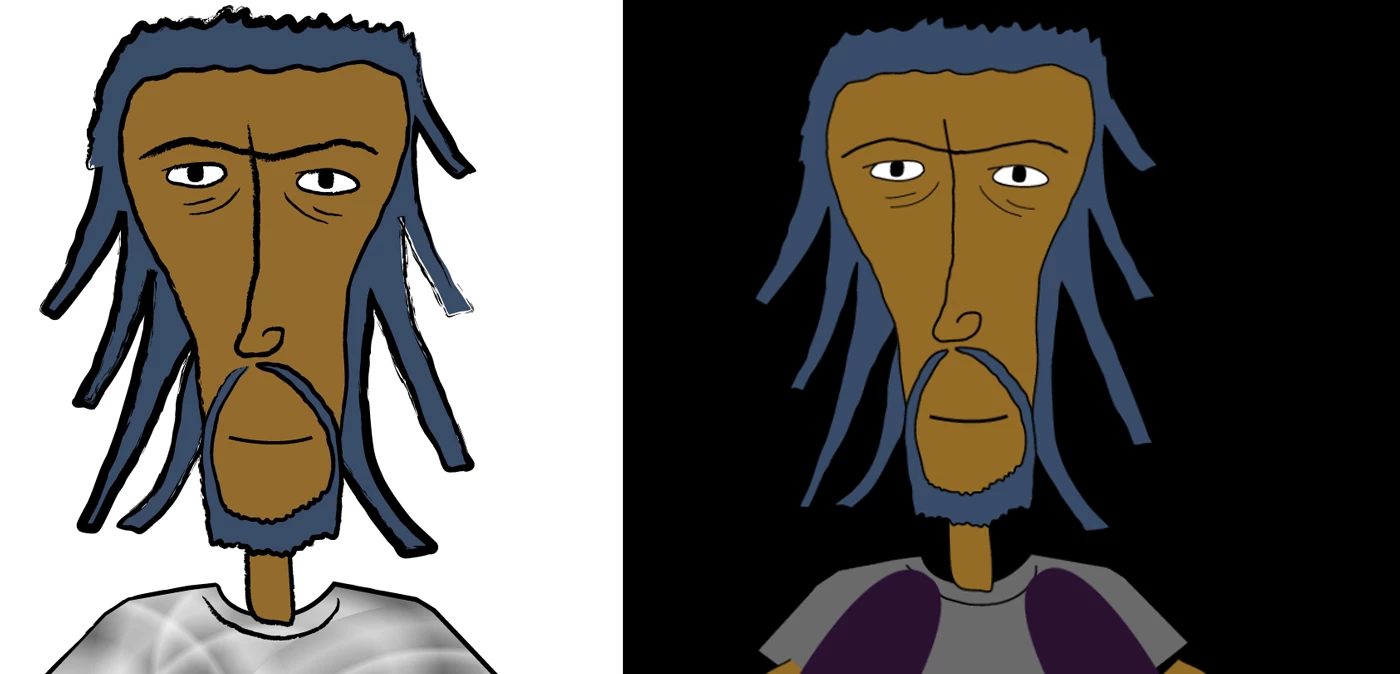
I am building a character in Illustrator for later use in Character Animator. The brush strokes that I am using in Illustrator are only coming into Character Animator as regular pixel strokes.

See below for an example. Also, the effects on the shirt in Illustrator are only showing up as a single solid color in Character Animator. Is there a way around this?

Thanks!
This topic has been closed for replies.

2 replies

DanielWilk
Adobe Employee
Adobe Employee
December 4, 2018

Select the puppet in the project panel and make sure "Render as Vector" is unchecked in properties panel. Not all Ai features are supported in pure vector mode.

https://adobe.ly/2zeBwvk

if that's not working we'd be happy to have a look at the file if you can share it somewhere

--dmw

ScooterD76
Legend
December 5, 2018

For brush strokes you can use Expand Appearance ( in Illustrator ), and most effects can be rasterized pre-CH

alank99101739
Legend
November 7, 2018

Not all illustrator features work in CH. I don’t know where a formal list is kept. You could try “smart objects” - I think in some cases that has helped. It seems to cache the rendered form so CH does understand that. ... I think.

Worth a try anyway.