Thanks Alan. I’m not at the computer now but I just imported all my scenes from AI where I made them 1280x720. So I don’t think I used zoom in at all. In CA I can’t see the characters bodies hanging off the page- I only see that when it’s converted.
This is my first animation with CA. It’s very slow so making them head only puppets isn’t the worst thing that can happen. Given they come in three times it would probably save a lot of memory.
Sharon.
Sent from my iPhone
If CA if you zoom out the scene window you should be able to see a grey semi-opaque border around the scene. You should be able to see the bodies of puppets through the semi-opaque border. I think this goes solid grey (100% opacity) when you start recording. If you cannot see this border, I would suggest adjusting the scene window zoom factor (not in the timeline - the scene window has its own scaling factor which is just used for playback). This is the quickest way to confirm that CA has the scale factor correct - no adjustments to the project, just zoom out the scene window.
Here is an example I grabbed off the web. See how the gray transparent border at the left edge? You can see the window etc through the grey semi-transparent border. Can you see a similar thing? The puppet bodies (not the heads) should be visible through the frame. If you are not getting the grey semi-transparent layer in front of the puppet bodies, then the contents of the scene is not scaled correctly. If you cannot see this grey border, I would adjust the scene window zoom factor (bottom right corner) until you can see it. (Just remember that if the artwork is all in scene, the gray opaque border may be hard to spot! ;-)
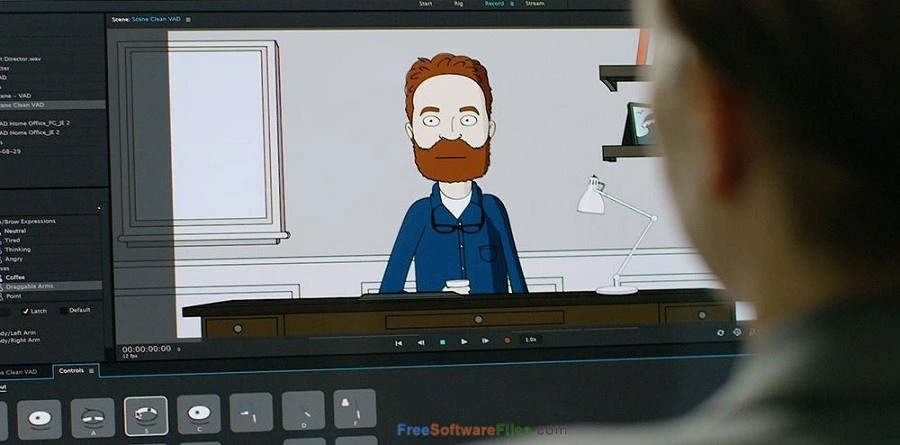
Even though the original AI files are the right resolution, you can scale them using the Transform behavior. If you can see the whole background with a black border around the original background file, and if the movie is the desired resolution, then *something* got in there and scaled things... Its just a question of what!
E.g. Maybe there is some media encoder setting to “autoscale to fit in all artwork”. I have never seen such a property however, which is why my first suspicion to rule out is that somewhere along the lines you scaled (on purpose or by accident).
Another experiement you could try is to just hide the puppets that are outside the desired area and try generating another video. Does the video come out right automatically then? Or does it still look wrong? If there is no puppet outside the normal bounds and it is still scaled wrong, that would eliminate the puppets causing the rescaling. Or redo the puppets without bodies - just trying to think of quicker ways to try and identify the cause of the problem.





 AdChoices