


JackMyth
Participant
Jul 30, 2017 12:08 PM UTC
Question

Camera doesn't Work

I want to use this software,but the camera doesn't work.

here is the screenshot:
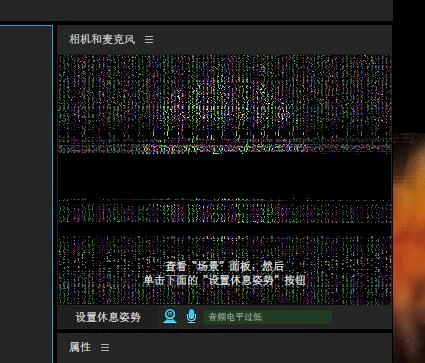
I'm using Notebook computer.This camera is the built-in camera.

I reinstall the software and graphics driver​. but this issue still happen.

what should I do?

This topic is closed to new replies. Start a new post to keep the conversation going.

8 replies

oksamurai
Legend
Jul 31, 2017 4:55 PM UTC

Hmm that's a new one to me - my best guess is there's something with the camera that isn't supported. What type of notebook is it? Do you have any specs on what type of camera it is as well?

Translate
JackMyth
JackMythAuthor
Participant
Aug 1, 2017 4:17 PM UTC

My notebook is Acer Predator G9-791 .In my memory my camera can work with a previous version.

About the camera....I don't know anything about it.

All software can work with the camera except Character Animator.Character Animator can detect the camera but can not get any image.

Translate
Jeff Almasol
Adobe Employee
Adobe Employee
Aug 2, 2017 5:07 PM UTC

Do you have another application that's currently using the webcam (e.g., Skype, video capture device, etc.) at the time you launch Character Animator? Contention with another application that wants to use the webcam might be a possible cause. Try quitting other applications including ones that might be running in the background that might use the webcam, then restarting Character Animator to see if that helps.

Translate