

nik5C88
Inspiring
January 29, 2021
Question

Can someone help me fix my mesh please ?

  • January 29, 2021
  • 4 replies
  • 689 views

I am still trying to get my character to do face turns, and I thought I had fixed the eyes to realise that most of my mesh is corrupted.

1. I selected contour instead of Auto/Rectangle for most of the parts, but the mesh remains a large rectangle as you can see for the eye below
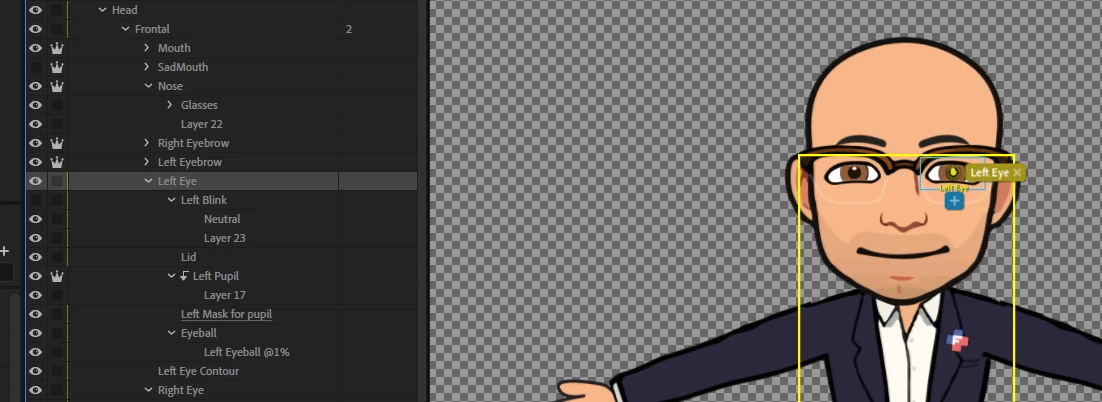
What I don't understand is why, when I zoom on the eye, the boundaries seem correct to me:
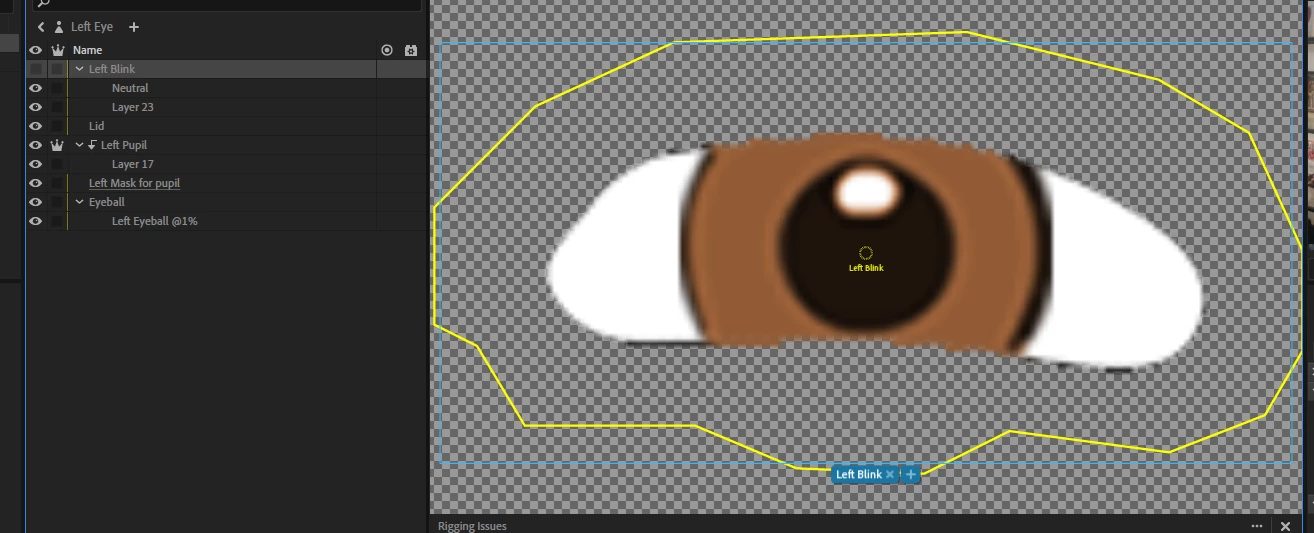
 

2. I looked for leftover pixels in Photoshop by adding a red backgound, but I can't seem to find any. If I select the Transform tool for the layer, the boundaries are correct (ie there is no leftover pixel outside the shape of the layer)


I uploaded the puppet here:

https://ln2.sync.com/dl/c4c6302f0/kdiamngg-7cgzix3e-cwvfs8mg-jjcti77e


It drives me nuts because as soon as I figure out how to fix something, something else breaks.


Thanks in advance if you can help

This topic has been closed for replies.

4 replies

alank99101739
Legend
January 31, 2021

You might have solved it already, but first a couple of points on the first puppet you shared.

Clicking on the "head" layer did not show all the mesh for the head layer. This is because you made the "face background" independent. The face background is about the only thing in the head that definitely should not be independent. The eyes, eyebrowse, mouth etc then attach to the background.


The rectangle is weird - I think it is because the artwork was disconnected - so it just made a guess.


Note also the blue bounding box goes right up to the top left order. There is something strange going on there - like the origins for some layers were dragged off the face. The blue bounding box for an eye should go just around the eye, not way off the screen. Or there is some stray pixels up there. Not the Eyeball layer might be the layer with soemthing wrong (extra pixels) - see ho there is a Right Pupil Range tag right up there?

The arms are also interesting. You made them independent, then lots of pins on it. I would consider whether you really want the arm independent. (It is not wrong, it is just not normal.)

----------

Part 2: newer puppet - I will start a new response.


nik5C88
nik5C88Author
Inspiring
January 31, 2021

I made my arms independent because in the correct puppet that I was copying, they were independent as well. And the pins are there to prevent them from wraping when I scratch my head.

alank99101739
Legend
January 30, 2021

I sometimes use that magic selection tool to select the eye then invert the selection and hit the delete button to get stray pixels. Note hidden layers count as part of the eye as well - not at computer to look directly sorry

nik5C88
nik5C88Author
Inspiring
January 30, 2021

Thank you Alan for your reply.

I did this to all the layers in PS, and then I checked again, and to the best of my knowledge, there are no stray pixeld, either in visible or hidden layers.

nik5C88
nik5C88Author
Inspiring
January 30, 2021

Here is the corrected version, which works as expected, except that I had to pin the Left Eyeball in Right Quarter view because it was getting deformed and I could not figure out why.

https://ln2.sync.com/dl/ae81ffda0/j5m85bi9-bknmxsfk-upfrqni8-75g88vdi


Cet
Inspiring
January 30, 2021

left eye's mesh shape is auto, and it is not independent.

Participant
January 29, 2021

Hi Nik,


You have a lot of weird stuff going on here. I downloaded your puppet and looked at your PS file. I can't readily see a solution. However, let me mention a few disturbances:

1. You have two extra handles on the top layer. I removed them. They are not the problem. Just a tech glitch.

2. The left and right eye need to be independent. Put a "+" in front of them. That did not change anything when I did it.

3. The right eye has something going on as I see a blue outline extending up and to the left of the eye. Hmmmm. Something is there. Could be a tech glitch???

4. Left and right eye contours are tied in with the body some how. I see the yellow outline from the contours to the body. I could not find the problem.

5. What is with the fixed handles on the arms. That is strange.


Nik, I don't have a solution for you, just an approach. If it were me, I would take the puppet apart and work on the head alone and see if I could get it working. Then start adding the other parts. Make a clean puppet and checking your design in stages. You are spending time a lot on extra layers. For example the eye contour could simply be a stroke around the eye and not separate layers. Try and simplify the design.


That's about all I can contribute. Be well my fellow puppeteer - Platty


nik5C88
nik5C88Author
Inspiring
January 30, 2021

Thank you for taking the time to explain clearly what you think is going on.

I agree with you. There are some very weird behaviours that I cannot explain either, it will probably be better to start again from scratch, one step at the time until I find the first problem.

Since I have a better understanding of Ch now, it should not take that long.

What do you mean by "handle" in #1 ?

#4 is what I think is causing all sort of issues, but yeah, I looked and looked and could not find the problem either. I think that somehow the head became disconnected from the body and I could not reconnect it because clicking it selects the torso (?!)

This software is awesome and a gamechanger, but it's still a bit buggy and the learning curve is steep.


Thanks again Platty. I really appreciated your help.