
December 12, 2019
Answered

Character Animation Lip Sync problem 3.1

  • December 12, 2019
  • 3 replies
  • 2546 views

Hello

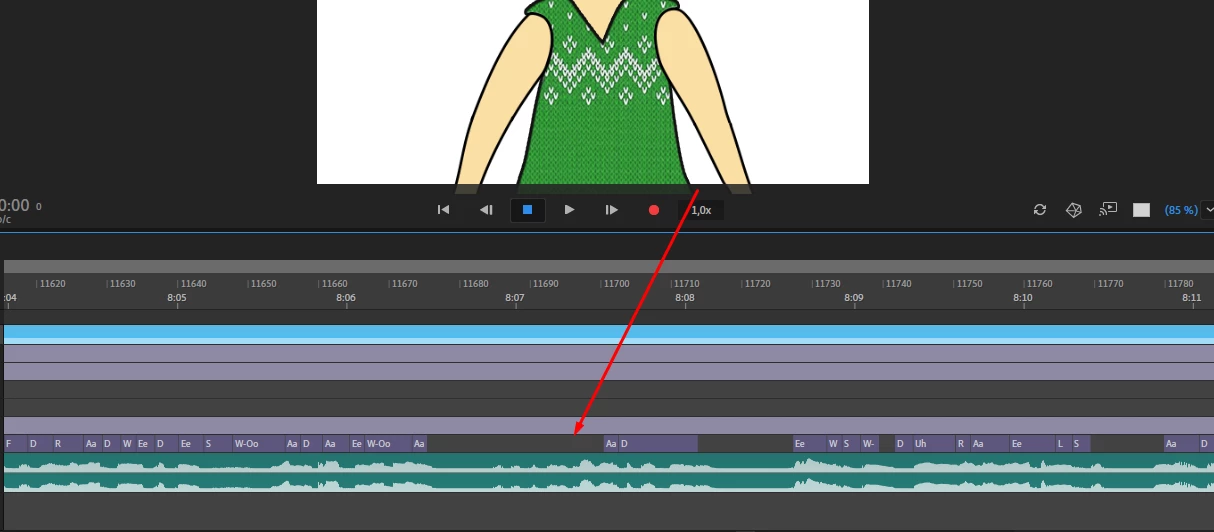
I started use character animation since 2018. Character Animation version 1.5 (2018) was good , mean lip sync have worked good but after version 2.0 everything going bad for me because lip syncs starts jump give spaces on timeline.  Everything i tried but i couldn't  figue out it. Please help me.


Documents  voice wav  and chracater animation files ->

https://drive.google.com/open?id=1wa4u4L0dXMDRxLZm5ci69vYpCMzE9zWY
This topic has been closed for replies.
Correct answer David Arbor

Lip sync has actually improved dramatically in the last couple of versions, The updated version actually produces fewer incorrect visemes, but if you want to reduce the threshold applied to whether a viseme is chosen you can go into Preferences > Lip Sync and increase "Viseme Detection" 


3 replies

Hamuza Network
Participating Frequently
June 19, 2020

I CANT SET UP VISEMES AFTER UPDATE TO VERSION 20.5


I have the same problem after updating to version 20.5.
I click the visemes frame AND NOTHING HAPPEN ! I double click it nothing happen!

Refering to the image below, when I click the "Ah" frame, nothing happen and I CAN'T SET UP VISEMES!
Previous version of adobe is ok.. i can set the visemes normally..


Is there any problem for version 20.5?
HELP ME!!!!!

Inspiring
June 19, 2020

This is the Adobe Character Animator thread, you should post this Adobe Animate forum to get some eyes from people who can hopefully help with your issue.

Participant
March 6, 2020

I'm having similar issues as ulas. I'm trying to change the Viseme Detection. My issue is that under Preferences, there's nothing for lip sync. I'm using the newest version of animate.

Inspiring
March 6, 2020

This thread is about Character Animator, not Animate CC.

Participant
March 6, 2020

Boy is my face red. Thank you for your reply!

David ArborCorrect answer
Inspiring
December 12, 2019

Lip sync has actually improved dramatically in the last couple of versions, The updated version actually produces fewer incorrect visemes, but if you want to reduce the threshold applied to whether a viseme is chosen you can go into Preferences > Lip Sync and increase "Viseme Detection" 


December 15, 2019

Thank you so much