


Known Participant
July 11, 2017
Question

Character Animator - Adobe Help Pages
  • July 11, 2017
  • 5 replies
  • 668 views

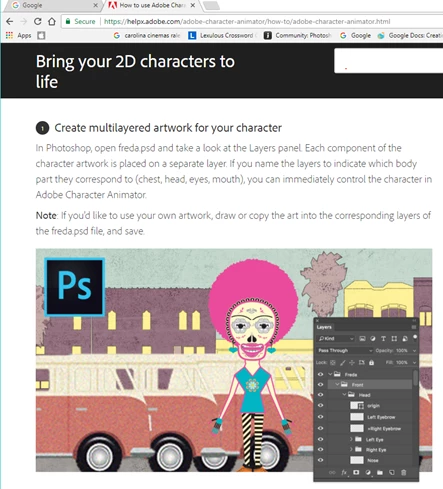
Could anyone,  anywhere tell me what the following means:  1.  Create multilayered artwork for your character    In Photoshop, open freda.psd and take a look at the Layers panel.  Each component of the character artwork is place on a separate layer.  If you name the layers to indicate which body part they correspond to (chest, head, eyes, mouth), you can immediately control the character in Adobe Character Animator   What does the underlined sentence mean  ? ?????

I opened freda.psd in Photoshop.  The layers already are named.  What is the person who prepared this Adobe page talking about ??

It continues with:  Note:  If you'd like to use your own artwork, draw or copy the art into the corresponding layers of freda.psd file and save. 

OK, I give up!  What does this mean?  Does it mean open a puppet you may draw, select say the eye from that , replace the corresponding freda layer with your eye ball copy ? 

For someone new to this, these instructions are crazy.

Can anyone help?

    This topic is closed to new replies. Start a new post to keep the conversation going.

    5 replies

    oksamurai
    Legend
    July 11, 2017

    I agree this could be clearer - we'll take a closer look.

    Character Animator lets you import PSD or AI files. If a layer or group in those files is named something specific like "Head" for example, that's a special word that Character Animator can recognize and translate into data for a live performance animated character. So anything inside a group you called "Head" should move with your head movements in a webcam in Character Animator.

    I would recommend skipping this tutorial, which is a little on the older side, and instead follow the Start panel "Open Interactive Tutorial" cartoon. The 3 lessons there should give you a better overview of what Character Animator can do.

    CoSA_DaveS
    Participating Frequently
    July 11, 2017

    Agreed, that's confusing. This part:

    > If you name the layers

    Is trying to say "Because the layers are named"

    MyYawroodAuthor
    Known Participant
    July 12, 2017

    Thanks much for your reply