


Participating Frequently
March 14, 2019
Answered

Character Animator: Audio Level Too Low

  • March 14, 2019
  • 11 replies
  • 13530 views

Hello,

I'm not able to get any live audio into Character Animator. It has always said "audio level too low". I've been trying it for 2 days and have been searching the help forums, but have had no luck.
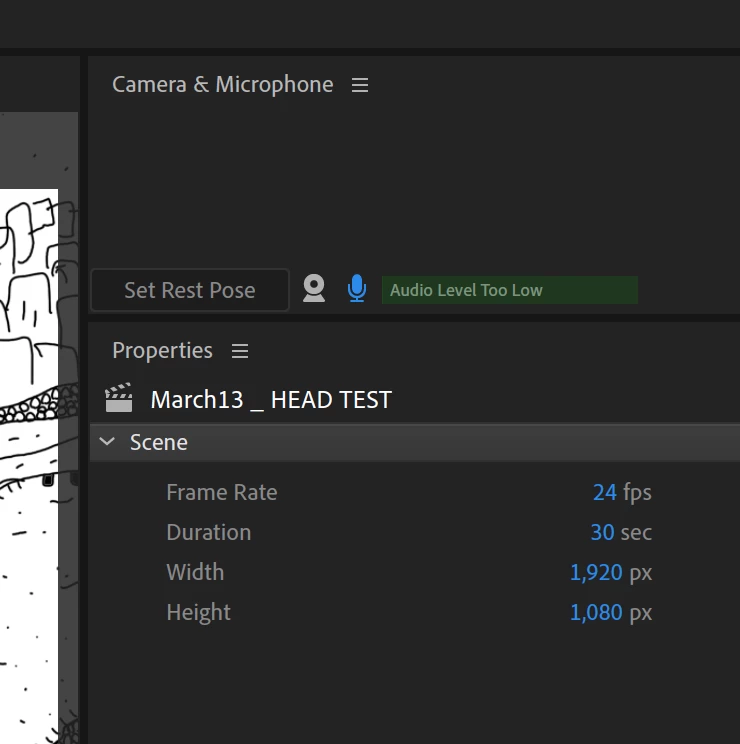
I'm using a Mac Book Pro - OS 10.14.3 and Character Animator 2.0.1. The audio input is set to the same input under system preferences and preferences within Character Animator. I've tried with the built in microphone as well as setting up a microphone with my apollo twin interface.

I get audio input via my system preferences as well as Adobe Audition. I can record fine in both, but CA gets no live input. I've been recording audio in Audition and importing that audio file into CA, but it would be nice if I could do live audio into CA. Not sure what is wrong.

I'm really loving this software so would be nice to get this issue fixed! Any help is appreciated. Thanks. 

Correct answer L.Bo

This solved the problem for me:

Character Animator didn't have permission to use the microphone, despite clicking Allow Access during set up.

System Preferences > Security & Privacy > Microphone - make sure Character Animator is checked.

Hope it solves your problems, too.

11 replies

alank99101739
Legend
March 15, 2019

Can you record audio and play it back? Is that a reasonable level? Or is it clearly recording at the wrong level? Are you sure its recording the same mic as you are expecting? (E.g. tap on mic) Which mic are you using? (Just trying to collect a bit more data. You obviously are aware that CH has its own audio settings to control which mic to use - does not use the system default. That is the first problem I normally check. Most common reason is it is not using the mic you expected.m)

Participating Frequently
March 16, 2019

Hi Alan, thanks for your response. 

The green bar in the camera pane does not respond at all, it only says "audio level too low." I'm not getting any audio levels live or recorded. When I record, I get a recorded section in my timeline, but it's empty - no sound.

The audio settings are in the preferences section under audio hardware, correct? Or is there another area for audio settings?