Participant
April 12, 2017
Answered

Character Animator (beta) Freezes at "Save As"

  • April 12, 2017
  • 3 replies
  • 946 views

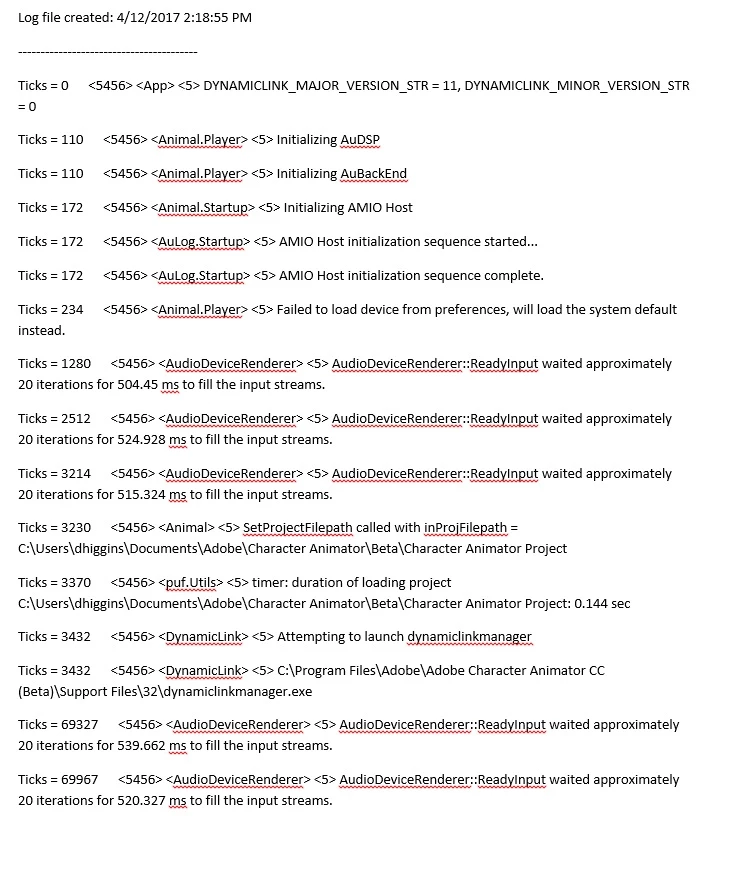
Hi, hoping you can help. I am having a lot of trouble with CH freezing when I try to Save a project. I've tried unplugging my camera, but that doesn't seem to work. It's also doing some random crashes when I go from Scene to Puppet. below is the bug report if that helps.

thanks

This topic is closed to new replies. Start a new post to keep the conversation going.
Correct answer Jeff Almasol

When the application is freezing, are you seeing any error message or is the application window just not responding (or showing a semitransparent white overlay) with a busy mouse cursor?

Do you have any background processes running that affect your user Documents folder, such as it being synced via Dropbox (or similar), backed up via CrashPlan or other backup program, or indexed via the OS? If so, could you try temporarily disabling or excluding the Documents folder from syncing and temporarily pausing backups to see if that helps?

Did this problem just start happening, or has it always done this?

Can you try creating a new project that's not within the Documents folder (e.g., just on your desktop) to see if that works, and Save As from that to another location (again, not within Documents) also works?

Thanks.

3 replies

Jeff Almasol
Adobe Employee
Jeff AlmasolCorrect answer
Adobe Employee
April 13, 2017

When the application is freezing, are you seeing any error message or is the application window just not responding (or showing a semitransparent white overlay) with a busy mouse cursor?

Do you have any background processes running that affect your user Documents folder, such as it being synced via Dropbox (or similar), backed up via CrashPlan or other backup program, or indexed via the OS? If so, could you try temporarily disabling or excluding the Documents folder from syncing and temporarily pausing backups to see if that helps?

Did this problem just start happening, or has it always done this?

Can you try creating a new project that's not within the Documents folder (e.g., just on your desktop) to see if that works, and Save As from that to another location (again, not within Documents) also works?

Thanks.

Participant
April 13, 2017

Hi Jeff,

thanks for getting back to me! Yes, I wasn't seeing an error message... it would stall out and then freeze. I tried temporarily disabling the Documents folder... it still crashed.

However, and I can't believe I never tried this, when I do a  "Save As" to the desktop and not my work's server, it worked! That should work for now. THANKS!

Jeff Almasol
Adobe Employee
Adobe Employee
April 13, 2017

Glad that's a workaround for now. We've made some changes to project saving in the next release of the software, so it'd be good to recheck if saving to your server is improved then.

(We haven't announced a release date for the next version, but we'll get the word out when it's ready.)

Thanks.