
omarf26801895
Participating Frequently
October 20, 2018
Question

Character Animator Project ( Libgit 2 Error ) OMG !!!? ?????

  • October 20, 2018
  • 3 replies
  • 2468 views

Hello guys please please help I don't know what happened I was just doing my project and my laptop closed suddenly I don't know why and restarted it and tried to open my Character Animator Project again , when i opened it suddenly it gave me this
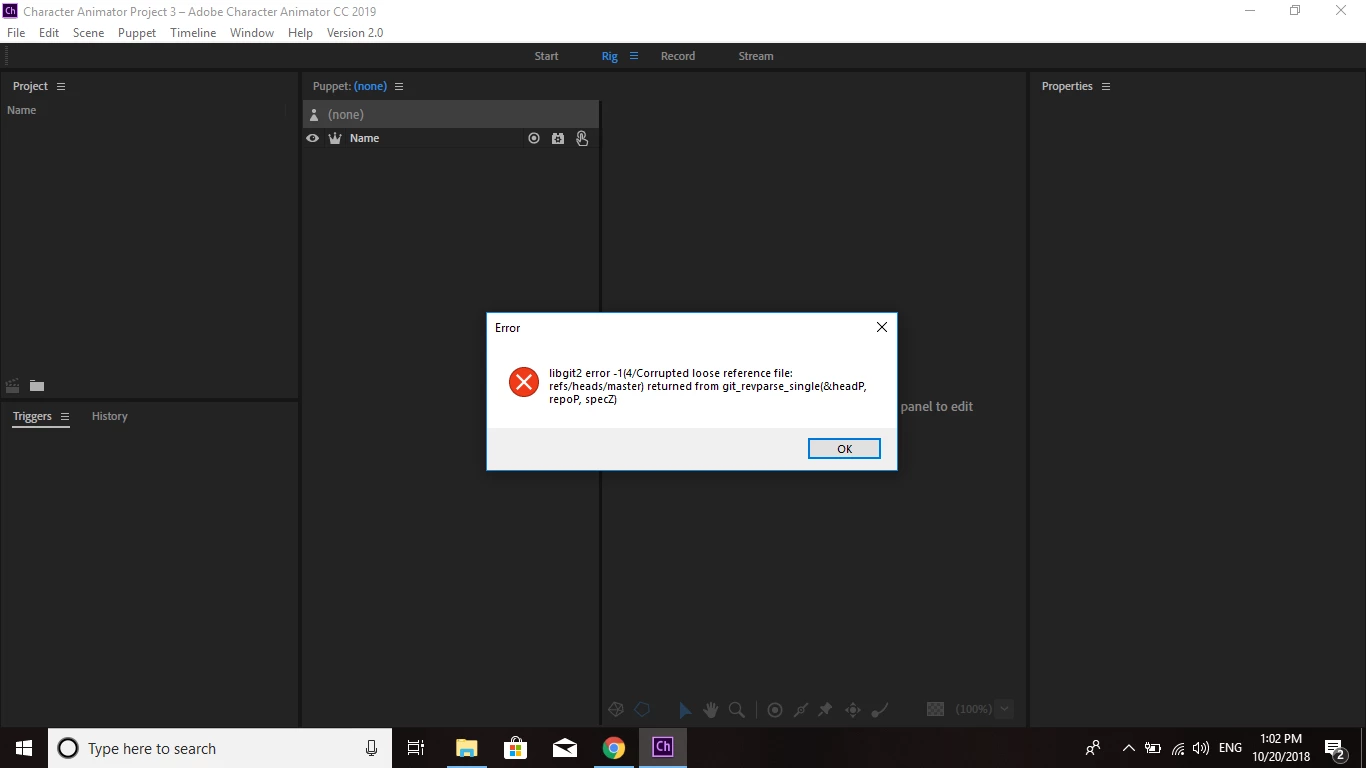
I don't know why and I took month to do my project I am so terrified to lose it , I didn't do anything , I didn't move anything I just opened it after my laptop suddenly closed and this happened even when I opened Character Animator from New it gives me same thing , please solution I need a clean and clear solution please .

I checked my Project's CH Date and I can see each and everyone puppets I made in my project and my backgrounds , briefly I can see my whole art Work inside the folder but the project doesn't open  and I tried about creating and objects folder in my repo.noindex but the folder is already there . Help Please

Thank You

    This topic has been closed for replies.

    3 replies

    R Kijko
    Participant
    November 12, 2018

    This has just happened to me too. I have an objects folder and it's happening on not just my current project but ones that previously were absolutely fine.

    A search on the forums turns up an issue where files have been moved but I haven't moved any of the files, they are on CC.

    I only have a days worth of work on the new project so I can rebuild fairly easily but still, if there is an easy (ish) fix, I'd be grateful - just in case it happens to the new project!

    The error message was

    libgit2 error -3(9/Object not found - no match for id (47f0e973e1fdcc3fd1ee16fdeb31e06364777936)) returned from git_revparse_single(&headP, repoP, specZ)

    DanTull
    Adobe Employee
    Adobe Employee
    November 12, 2018

    Yikes. I don't think I ever heard back from the original poster on the thread, but my offer stands to attempt to diagnose/repair projects folks send my way (I have been able to fix several projects from other sources). This serves multiple purposes: 1) a customer avoids losing work, 2) I might find a bug that can avoid similar problems, or 3) even when the issue resulted from sync/file/other issues outside of our control I learn something that helps us be more robust or informs the design and implementation of "recovery mode" features for our project format.

    In this case, since you mention the files are on CC, is there any chance that multiple copies of Ch had the project open at the same time on different computers?

    Thanks,

    Dan Tull


    P.S. Probably the best way to send the project is to zip it up and send me a download link to the zipped copy via a private message. If the assets for the project are large or you'd rather not share them, strictly speaking for this kind of error I most likely only need to see the contents of the "Ch Data/repo.noindex" subfolder of the project.

    jaypauln44555138
    Participant
    November 27, 2018

    would you be able to look at my file for me? i am having the same issue. i will send it to you via PM

    DanTull
    Adobe Employee
    Adobe Employee
    October 22, 2018

    I may be able to repair the project if you want to zip it up and send it to me (a download link to a private message to me via this forum should work). FWIW, that sort of error probably doesn't require me to have all your artwork/recordings, so if those are large don't feel like you have to transfer them. The part I'll need is the repo.noindex folder itself.

    Thanks as always for the heads up, Alan!

    DT

    DanTull
    Adobe Employee
    Adobe Employee
    October 22, 2018

    FWIW, if I'm remembering my error messages right, this may just be a matter of repointing one of the files in the refs/heads folder of the project to a valid history state. A power outage may have resulted in those being updated before the database fully committed the changes to which they refer. If that is the case and the database isn't actually damaged, it should be relatively easy for me to fix.

    DT

    Participant
    June 5, 2020

    @DanTull, I experienced a very similar problem and private messaged you a link to the files on June 1, 2020.  Have you had opportunity to evaluate?  Thanks so much.

    alank99101739
    Legend
    October 20, 2018

    Ugg. I would search the forums on “libgit2” and similar - there have been the occasional occurrance of this. But the Adobe support folks have helped a few people recover projects as well (I would take a backup immediately before trying anything else). DanTull​ sometimes has time. But that is a more ugly one to fix. You can try reaching out on the Adobe Support area of the forums.