michaelm17258939
Participant
March 7, 2017
Answered

Character Animator Temp File Error

  • March 7, 2017
  • 1 reply
  • 1628 views

Hello,

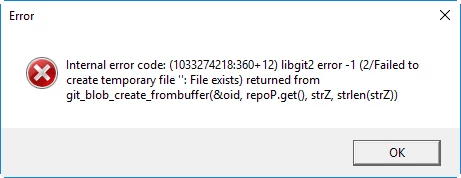
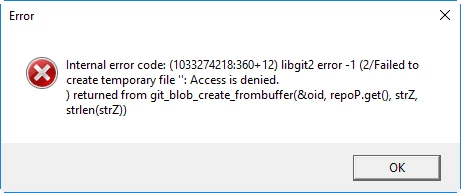
The following two error messages display upon startup of Character Animator and I cannot use the software. I can eventually import a puppet if I click OK multiple times every 3-4 seconds but I just cannot create a scene.

I have tried deleting the project folders, turning off all cloud based syncing, and reinstalling the software but still get the same result. 

Any thoughts on how to correct this?

-Dell Latitude E5470

-16 GB RAM

-500GB SSD hard drive (108 GB used)

-Intel i5 2.4GHZ

-Windows 10 Enterprise
This topic has been closed for replies.
Correct answer oksamurai

"Failed to create temporary file" seems to suggest a permissions issue. Usually, your projects and files are stored in your Documents > Adobe folder by default, unless you picked a different destination. Even if Ch starts up blank, it makes an empty new project. Temp files are most likely being written into your Ch Data > temp.noindex folder there...so it seems like for some reason CH is having trouble writing there.

Is there any reason you can think of why that would be happening? Using a company or school computer, saving into a Dropbox folder with different settings/permissions, etc? If not let me know and I an ask the extended team to see if they have any guesses.

1 reply

oksamurai
oksamuraiCorrect answer
Legend
March 7, 2017

"Failed to create temporary file" seems to suggest a permissions issue. Usually, your projects and files are stored in your Documents > Adobe folder by default, unless you picked a different destination. Even if Ch starts up blank, it makes an empty new project. Temp files are most likely being written into your Ch Data > temp.noindex folder there...so it seems like for some reason CH is having trouble writing there.

Is there any reason you can think of why that would be happening? Using a company or school computer, saving into a Dropbox folder with different settings/permissions, etc? If not let me know and I an ask the extended team to see if they have any guesses.

michaelm17258939
Participant
March 8, 2017

I am using a company computer. Armed with your file permission suggestion, I visited our IT folks. They are able to correct the problem by tweaking the file permission settings within the actual Adobe folder (by deselecting Read-only) along with the write settings in Symantec Endpoint Protection.