samh19821728
Known Participant
June 6, 2018
Answered

Character Movement

  • June 6, 2018
  • 1 reply
  • 465 views

Hello,

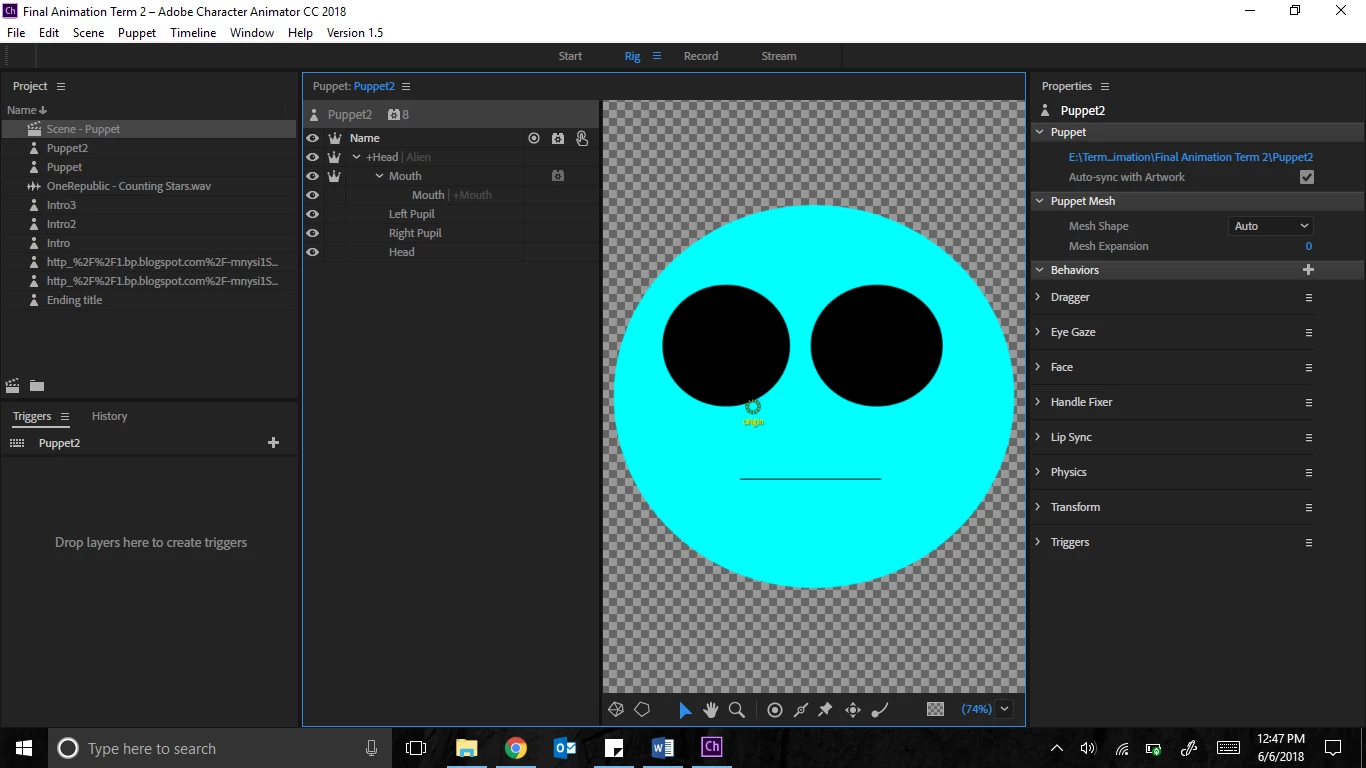
I am trying to move a character that I made from scratch around in photoshop, but seem to be unable to move it at all. Below is an image of my layer structure.

    This topic is closed to new replies. Start a new post to keep the conversation going.
    Correct answer alank99101739

    How are you trying to move it? With the webcam? Or with a dragger? I will assume with the webcam. I notice you have a Head layer, and under that is another Head layer. This can get Ch confused. If you click on the ”Head” layer, you should see over the puppet properties panel “tags”. I think you will find both “Head” layers will have the “Head” tag on them. CH uses the tags, not the actual layer names - but it auto-tags layers based on their names. So having two “Head” layers will have both tagged with the “Head” tag. Remove the “Head” tag from the nested Head layer and see if things start working better. I would then rename the nested Head layer to something else (e.g. “face” etc) to avoid the tag accidentally coming back again later.

    I also notice you have “Mouth” with a nested layer “Mouth”. That can cause the same problem - you may end up with two layers tagged as being the mouth, which can confuse things. You can manually fix it by the tags, but again, I would fix up the layer names. A simple rule is to not repeat layer names in the puppet - but really this is only important for the special layer names.

    If you click on the “A” button in the property panel, it will show the tag names as text instead of pretty icons. Any layer name with those names will get autotagged (with a few special cases just to confuse things).


    1 reply

    alank99101739
    alank99101739Correct answer
    Legend
    June 6, 2018

    How are you trying to move it? With the webcam? Or with a dragger? I will assume with the webcam. I notice you have a Head layer, and under that is another Head layer. This can get Ch confused. If you click on the ”Head” layer, you should see over the puppet properties panel “tags”. I think you will find both “Head” layers will have the “Head” tag on them. CH uses the tags, not the actual layer names - but it auto-tags layers based on their names. So having two “Head” layers will have both tagged with the “Head” tag. Remove the “Head” tag from the nested Head layer and see if things start working better. I would then rename the nested Head layer to something else (e.g. “face” etc) to avoid the tag accidentally coming back again later.

    I also notice you have “Mouth” with a nested layer “Mouth”. That can cause the same problem - you may end up with two layers tagged as being the mouth, which can confuse things. You can manually fix it by the tags, but again, I would fix up the layer names. A simple rule is to not repeat layer names in the puppet - but really this is only important for the special layer names.

    If you click on the “A” button in the property panel, it will show the tag names as text instead of pretty icons. Any layer name with those names will get autotagged (with a few special cases just to confuse things).