Participating Frequently
November 11, 2019
Answered

Characters pupils don't match in CH

  • November 11, 2019
  • 2 replies
  • 702 views

Hi all, 


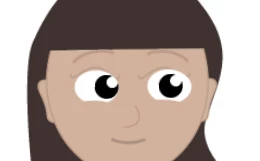
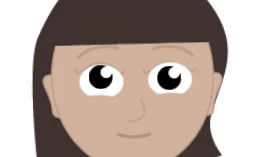
I've got a tiny challenge with my character's left pupil. Would greatly appreciate any advice! The right eye is working correctly, the pupil moves to the far edge of the eye ball when looking in different directions, however the left eye doesn't move very far at all, and you can see in image 1 when looking left, the eye ball shifts as well. 

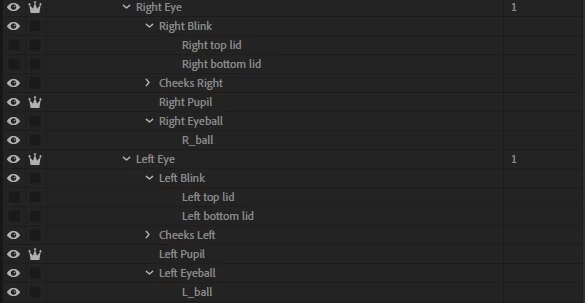
I believe I've tagged everything correctly 

Right eye (independent) = right eye

Right pupil (independent) = right pupil and right pupil size

Right eyeball = right eye and right pupil range


Same on the left side
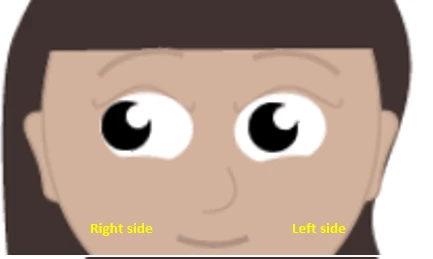


I had a read of this https://extra-ordinary.tv/2018/04/21/debugging-character-animator-eyess/ and went hunting for stray pixels, so far haven't found any. Run out of troubleshooting ideas 🙂


Thanks in advance 🙂 


Titled edited by Mod

 
This topic has been closed for replies.
Correct answer alank99101739

I would suggest comparing the tags for the left and right eyes, particuarly the Pupil Range tags. They might be on different layers or something. What I would do is basically open each level, then click on every layer one by one, and compare the same layer in the left and right eyes.


The other thing you can try is turning on the yellow mesh. Does that look the same for both eyes? 


Otherwise sharing the puppet is the next step. I vaguely remember something similar, where one pupil seems to move half the distance of the other pupil, but I cannot quite put my finger on it. It was probably a tagging issue...

2 replies

alank99101739
alank99101739Correct answer
Legend
November 21, 2019

I would suggest comparing the tags for the left and right eyes, particuarly the Pupil Range tags. They might be on different layers or something. What I would do is basically open each level, then click on every layer one by one, and compare the same layer in the left and right eyes.


The other thing you can try is turning on the yellow mesh. Does that look the same for both eyes? 


Otherwise sharing the puppet is the next step. I vaguely remember something similar, where one pupil seems to move half the distance of the other pupil, but I cannot quite put my finger on it. It was probably a tagging issue...

Participating Frequently
November 27, 2019

Hey hey, 

Oh you're amazing, you were totally right, it was the tagging issue. Sigh... I had the pupil range tag associated with the eye ball AND eye. 


Thanks so much 🙂  

Shivangi_Gupta
Community Manager
Community Manager
November 20, 2019

Hi there,


Thanks for reaching out. I appreciate that you tried to fix the issue with the pupil movement. We'll be happy to troubleshoot this further. Could you more details?


  • Which version of Character Animator are you using?
  • Could you share your puppet here? We'd like to test it at our end.


Looking forward to your response.


Thanks,

Shivangi