
Chasing Pyre
Participant
March 13, 2018
Answered

Choosing the time length of a scene

  • March 13, 2018
  • 2 replies
  • 6307 views

This may seem silly and there's probably a real obvious answer, but I was wondering how to choose the length of a scene. I was creating a quick sample video, The recording only take about 25 seconds. however when I save it to a video it's about a 1:10 long. I tried trimming what's recorded but that just makes the video after the first 25 seconds black.
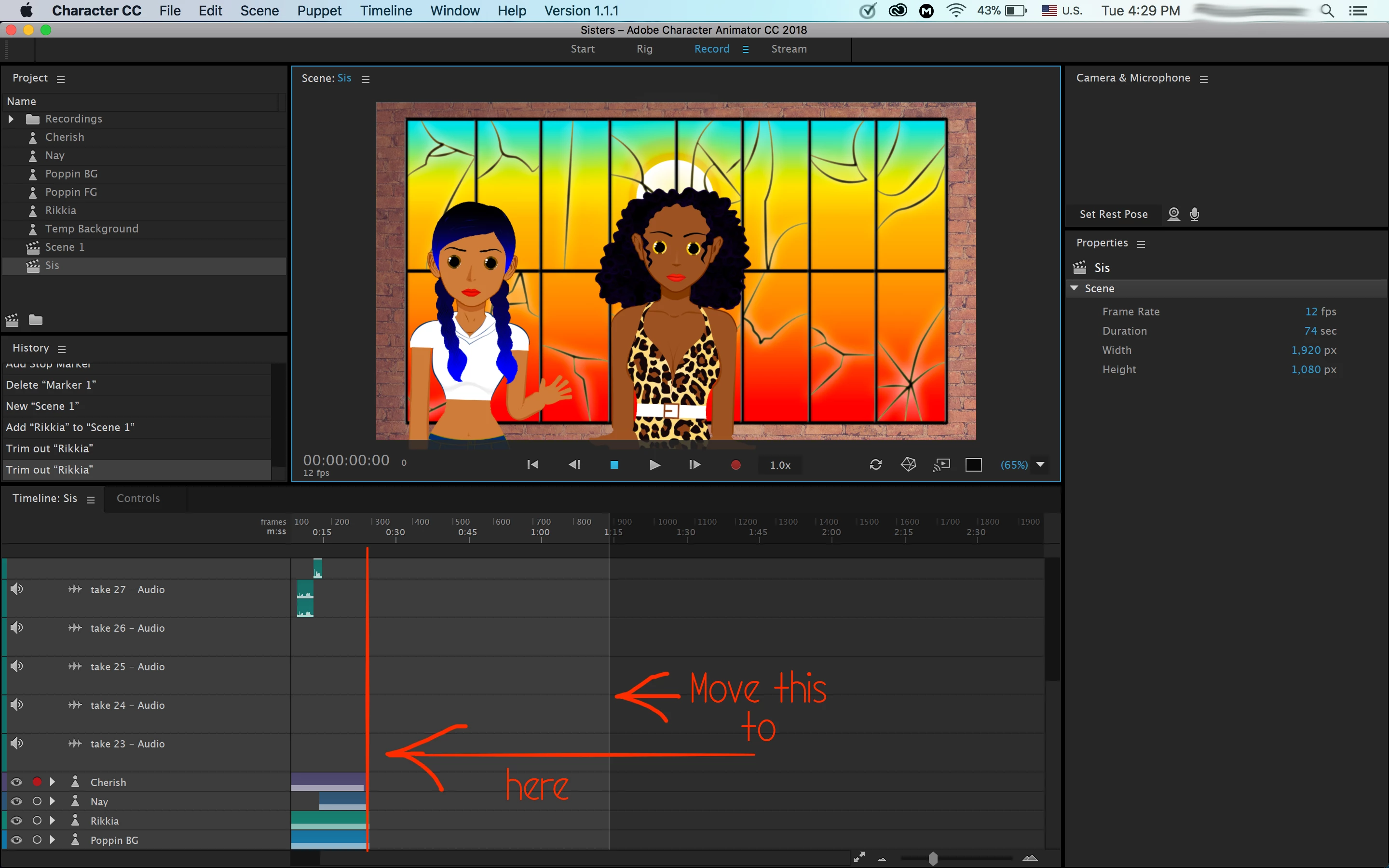
Is there a way to it in character animator like it is in After Effects, where you can choose the time length when you create a new composition? Or should I just dynamic link the scene into After Effects and trim out all the blank time.

This topic has been closed for replies.
Correct answer alank99101739

If you single click on the scene, you should be able to see the properties. One of the properties is duration.

Yeah, it would be nice to drag the edge of the light colored area, but you can’t. Changing the “duration” property of the scene is the only way I know of.

(If you look over to the right side of the screen you will see the scene has “Duration” set to 74 seconds at present - just click on it and change the number to 25.)

2 replies

Participant
October 8, 2020

This is a good answer, and would definitely work, but the easiest way to alter the legth of your scene like you're trying to do, is to move the little slider that shows where in the scene you're viewing (AKA the "playhead") to where you want your scene to end. Then, just go to the timeline tab and hit the "set duration to playhead" button. It'll make your video end right where you had your slider. 

Hope this helps 🙂

phillipm97986411
Participating Frequently
June 27, 2021

Where is the set duration to playhead button?


alank99101739
Legend
June 27, 2021

Its not a button I think - right clicking on the blue knob at the top of the playhead brings it up (and it might be in the menus as well).


alank99101739
alank99101739Correct answer
Legend
March 14, 2018

If you single click on the scene, you should be able to see the properties. One of the properties is duration.

Yeah, it would be nice to drag the edge of the light colored area, but you can’t. Changing the “duration” property of the scene is the only way I know of.

(If you look over to the right side of the screen you will see the scene has “Duration” set to 74 seconds at present - just click on it and change the number to 25.)