
Inspiring
December 2, 2017
Answered

Clean File Structure - Adobe Illustrator

  • December 2, 2017
  • 1 reply
  • 495 views

This is most probably a simple fix, I am hobbyist and not totally used to this stuff, but this issue is driving me mad.

When I construct my puppet in Adobe Illustrator I get lots of layers that confuses things. I have tried grouping the strokes and fills where ever possible, with limited success. When I compare my puppets to those that come with Character Animator, mine are so complicated compared to the to the simple and clean puppets provided as examples by Okay Samurai. That is what I am trying to get to. Therefore the question: How do I simplify the file structure. If you look below at my example I have four layers for the black surround of the eye pupil, this only needs to be one layer including the white centre of the pupil which is an additional four layer. If I review the puppet in Illustrator it tells me the four layers are  'grouped' but I 'ungroup it' to then 'group' the four layers I go back to where I started and Illustrator does not provide me with the option to 'group'.

Help me Obi-Wan Kenobi you my only hope. And thank you Okay Samurai for your monthly output and training videos they are really helpful even if they show up flaws in my own work like this.

https://www.youtube.com/user/okaysamurai
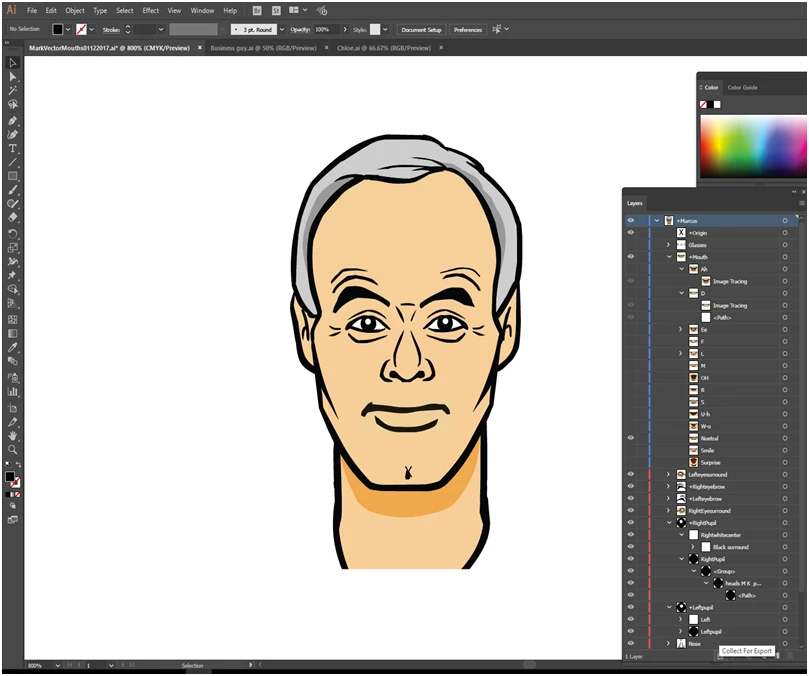
    This topic has been closed for replies.
    Correct answer alank99101739

    In case helpful, I also get pretty complicated AI files - especially when starting with "Adobe Draw" on the iPad. I just spend the time to introduce lots of sublayers to get the grouping under control. I also spend a bit of time using "Unite" (under PathFinder / Shape Modes) to merge things like different line segments that should have been joined. View/Outline mode (^Y) helps me spot lots of little daggy objects floating around.

    But the real message is "its not just you! I get complicated files as well."  I suspect OkaySamarai's files are purposely clean to help be good demos of individual concepts. (That and because he is a genius at Character Animator.)

    1 reply

    alank99101739
    alank99101739Correct answer
    Legend
    December 7, 2017

    In case helpful, I also get pretty complicated AI files - especially when starting with "Adobe Draw" on the iPad. I just spend the time to introduce lots of sublayers to get the grouping under control. I also spend a bit of time using "Unite" (under PathFinder / Shape Modes) to merge things like different line segments that should have been joined. View/Outline mode (^Y) helps me spot lots of little daggy objects floating around.

    But the real message is "its not just you! I get complicated files as well."  I suspect OkaySamarai's files are purposely clean to help be good demos of individual concepts. (That and because he is a genius at Character Animator.)

    Inspiring
    December 8, 2017

    Thank you for that at least I know I am not going mad