


Inspiring
May 22, 2020
Question

Clipping Mask Not Functioning as expected.

  • May 22, 2020
  • 1 reply
  • 730 views

I believe this is a bug, but I am not sure.


I am trying to give my character a permanent shadow when his arm crosses his body, so I thought I could accomplish this with a clipping mask, but here is the result:
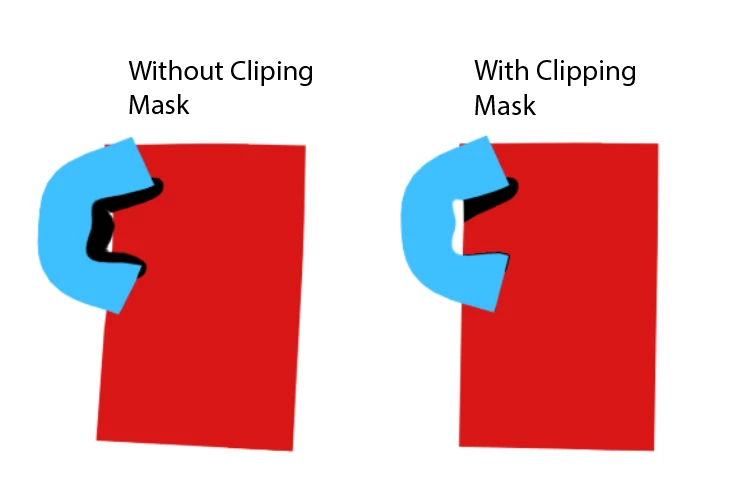
 

The shadow just turns into an outline. Here are the layers:
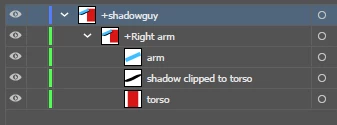
 

I have tried many different layer combinations and different work arounds. I even made a second "ghost" arm over the real arm, but the clipping mask still didn't funtion correctly and only showed the shadow ON the arm instead of in the torso.


So is this a bug, or just a limitation? I have been going crazy over this.

This topic has been closed for replies.

1 reply

Jeff Almasol
Adobe Employee
Adobe Employee
May 23, 2020

Hmm, I'm having trouble reproducing the issue. I've tried in both CH 2.1.1 and 3.3 (latest), using an AI file saved from AI 24.1.2 (Illustrator 2020 or Illustrator CC format). What version of CH are you using, and what version of AI are you saving from?

Is the "shadow clipped to torso" created using the Pel tool without any effects applied?
If you duplicate the "arm", change its color to black, place it under the original and offset it so it's like a shadow, does that produce similar results?