
Participant
November 7, 2021
Question

Combining views for turning in walk

  • November 7, 2021
  • 1 reply
  • 338 views

I'd appreciate any pointer to details on how how to combine figures for turning when walking. Our characters are drawn in Illustrator - in which my skills are distinctly moderate (that's probably an overstatement!). The jpg shows what comes through from our artist and you can see how they are used at www.thisispaston.co.uk/animatedpastons.html. (They're grouped together there but used separately on other parts of the site.) They're based on an actual medieval family and used for educational purposes. I think I've checked out most of the training videos videos and can see what we need from the 'Walk' video, but would like to find a better explanation of the Illustrator or Character Anim process for setting up.
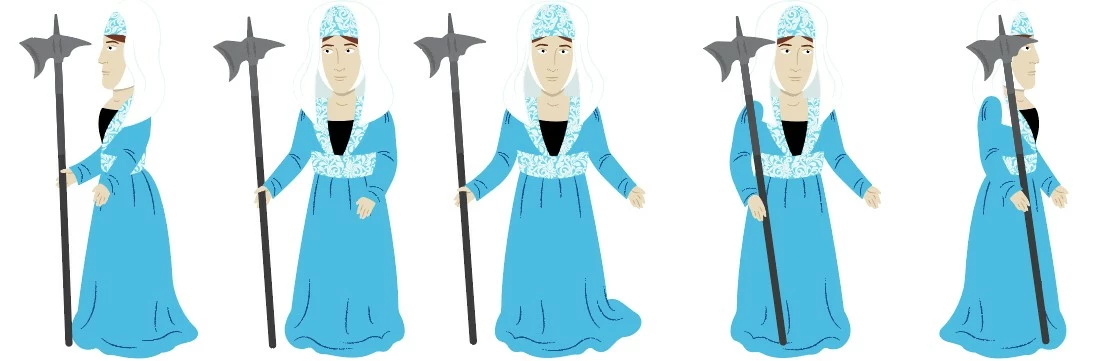
This topic has been closed for replies.

1 reply

TheOriginalGC
Community Expert
Community Expert
November 8, 2021

Rigging for body turns are explained in this video, starting at approximately the 39 minute mark:  https://youtu.be/gWBLAcTWH5Q?t=2383 I am not certain how many positions you are limited to. Good luck.

Participant
November 8, 2021

OK, many thanks. I had spotted that one but I'll go over it again. Just to clarify, I have to unify the three (or even five) images inside Illustrator before I move them into CA as a puppet? There's no way of unifying them within CA? I guess I can open the Unicorn in Illustrator (which granddaughter is itching to try with full body capture, having already become Hopscotch!) and having a look at the structure. Is there anything in PDF form defining the strucutre?


TheOriginalGC
Community Expert
Community Expert
November 8, 2021

What do you mean by "unifying?" They need to be in a single file.