I am not able to simply select the visemes and copy and paste. If I put the cursor on it, it simply puts a white line on it and I cannot simply drag across like I can with behaviors. It drags the visemes. So either it's not possible, or I'm doing something wrong in the selection.
The reason I need it is because I create children's songs. I have different characters singing at different times. I do not want to have to break up the music (that would be very difficult, time consuming, and perhaps impossible to really get correctly). I want to break up the visemes. These are more accurate than recording in my facial expressions, but if I have to I will do that.
I could not work out how to copy and paste individual visemes either. I can select them, but "Edit/Copy" in the menu is disabled.
I could copy and paste a full lipsync take. Just single click on the bar above the visemes (e.g. the bar in blue in the screenshot below), go to the menu and select Edit/Copy, then click on the other puppet (e.g. "Liana REAR" in the screen shot) then select "Edit/Paste" from the menu. (Control-C and Control-V are the same thing). That is however copying the whole take (with all the visemes in the take).
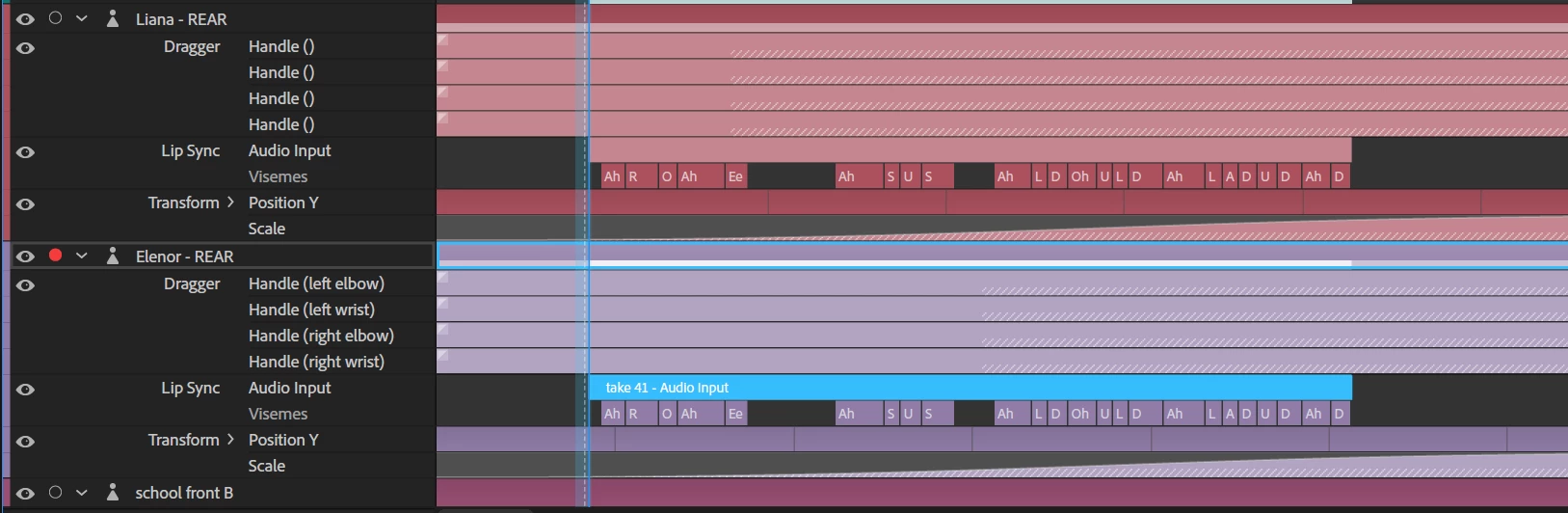
You can adjust the length of the take however (to hide the stuff you don't want). I tried to do "Edit/Split" on the lipsync take to chop it up into smaller parts to copy:

It sort of worked, but if I stretch out the take again it becomes clear split just cloned the take and trimmed the endings (everything in the take is still there!). That is probably not a problem in practice.
So maybe you need to split your lipsync takes, then copy the take and paste that into the other puppet. Hopefully that is close enough to what you need.
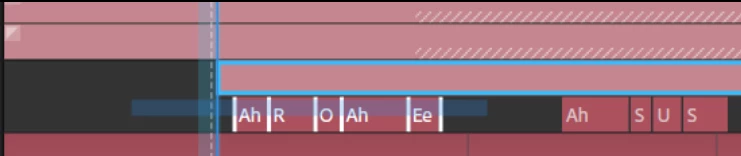
(I would have thought you could copy/paste visemes, but I could not get it to work either when I tried. I can select a subset of visemes by dragging out a rectangle to cover them (see screenshot), but then all I could do was move them sideways or delete them. "Edit/copy" is disabled in the menu, so it looks like its not supported.)





 AdChoices