
Could anybody tell me why am I getting these errors? I can't get the mp4 or Alpha to process...
And yes, everything is there. I just finished working on it..
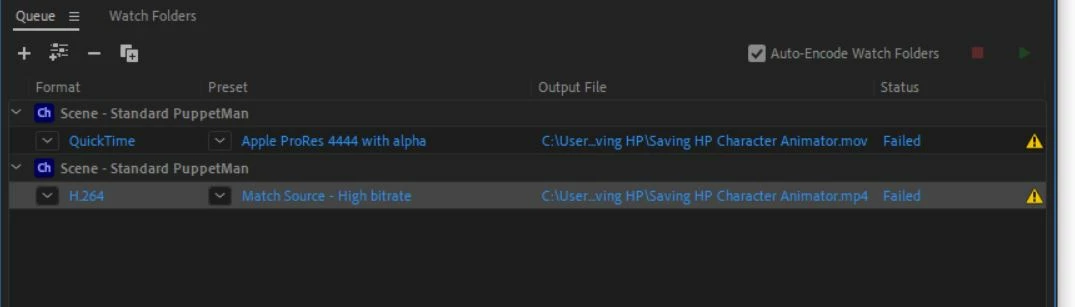
I got this too:
- Source File: C:\Users\Edgar\AppData\Local\Temp\crystal ball.prproj
- Output File: C:\Users\Edgar\Desktop\Stuff\Adobe\Premier Pro\Crysta Ball\Crystal Ball Final.mp4
- Preset Used: Match Source - High bitrate
- Video: 1920x1080 (1.0), 30 fps, Progressive, Hardware Encoding, Nvidia Codec, 00:12:02:12
- Audio: AAC, 320 kbps, 48 kHz, Stereo
- Bitrate: VBR, 1 pass, Target 10.00 Mbps
- Encoding Time: 00:00:27
06/17/2021 05:02:13 PM : Encoding Failed
-------------------------------------
The Operation was interrupted by user
-------------------------------------
- Source File: C:\Users\Edgar\AppData\Local\Temp\encoder .prproj
- Output File: C:\Users\Edgar\Desktop\Stuff\Adobe\Premier Pro\sensor ruler encoder.mp4
- Preset Used: Match Source - High bitrate
- Video:
- Audio:
- Bitrate:
- Encoding Time: 00:00:00
07/13/2021 02:34:18 PM : Encoding Failed
------------------------------------------------------------
Could not read from the source. Please check if it has moved or been deleted.
------------------------------------------------------------
- Source File: C:\Users\Edgar\Desktop\Stuff\Adobe\Character Animator\Saving HP\Saving HP\Saving HP.chproj
- Output File: C:\Users\Edgar\Desktop\Stuff\Adobe\Character Animator\Saving HP\Saving HP Character Animator.mov
- Preset Used: Apple ProRes 4444 with alpha
- Video:
- Audio:
- Bitrate:
- Encoding Time: 00:00:00
08/23/2021 03:53:22 PM : Encoding Failed
------------------------------------------------------------
Could not read from the source. Please check if it has moved or been deleted.
------------------------------------------------------------
- Source File: C:\Users\Edgar\Desktop\Stuff\Adobe\Character Animator\Saving HP\Saving HP\Saving HP.chproj
- Output File: C:\Users\Edgar\Desktop\Stuff\Adobe\Character Animator\Saving HP\Saving HP Character Animator.mov
- Preset Used: Apple ProRes 4444 with alpha
- Video:
- Audio:
- Bitrate:
- Encoding Time: 00:00:00
08/23/2021 03:54:50 PM : Encoding Failed
------------------------------------------------------------
Could not read from the source. Please check if it has moved or been deleted.
------------------------------------------------------------
- Source File: C:\Users\Edgar\Desktop\Stuff\Adobe\Character Animator\Saving HP\Saving HP\Saving HP.chproj
- Output File: C:\Users\Edgar\Desktop\Stuff\Adobe\Character Animator\Saving HP\Saving HP Character Animator.mp4
- Preset Used: Match Source - High bitrate
- Video:
- Audio:
- Bitrate:
- Encoding Time: 00:00:00
08/23/2021 03:58:02 PM : Encoding Failed


 AdChoices