

aforetaste
Known Participant
November 14, 2018
Answered

Cycle Replays

  • November 14, 2018
  • 2 replies
  • 2122 views

Just loving the new Replay feature!

Is there a way to set a Replay to cycle forever or maybe to loop and only be stopped with a trigger?

My issue:

I use the Breathe behavior, but I need it to move the head up and down (offset) as well as the chest.

As it currently is set up, the head stays lock solid unaffected by the Breathe behavior.

So, my sorta-fix is to animate my own head up and down (in unison to the Breathe timing), make it into a Replay and then to trigger it in unison with the torso breath. But, I need it to loop/cycle forever.

Is that a feature request?

Thanks in advance,
This topic has been closed for replies.
Correct answer KJerryK

I would love to know how you did this.

When I load Wendigo from the start page, it doesn't operate as you have it.

The default seems to have the static head and breathing torso.

Are you able to reveal your magic?


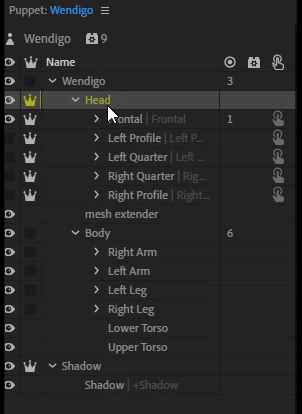
After playing around some, all I (think) I did was change crowns on the head. Here is a screen cap of my setup. Compare it with the setup of the original, where the indicated crown is one level up, and the Head group is uncrowned.

2 replies

DanTull
Adobe Employee
Adobe Employee
May 3, 2019

Vote for the idea here (add comments to clarify too if the existing suggestion doesn't quite cover it): New “loop forever” replay mode – Adobe video & audio apps

alank99101739
Legend
November 14, 2018

I don’t think its supported. Vote now! New “loop forever” replay mode – Adobe video & audio apps   ... Oh, sorry, US elections are over arnt they....

aforetaste
Known Participant
November 14, 2018

Thank goodness the US elections are over.

But I'm glad to vote again for such a great feature! Thx!

If only our politicians were so useful...

KJerryK
Legend
November 14, 2018

Another way to make the head move with the breathe behavior is to adjust the rigging.