It is up to you whether you delete them or not. If the take is fully "greyed out" due to another take over the top, then it has not effect, If you do a blend, you will notice the old take is active for the duration of the blend. So if fully greyed out, delete away.
In this example, the bottom take is fully obscured by newer takes - so it can be safely deleted.
The middle of the three takes is still active, including during the blend in and out of the top of the three takes. So deleting that one would have a negative effect.

To delete, just click on the take and hit the DEL key. If the take when selected will have a blue line around it (e.g. the bottom one) or solid blue (e.g.the top one). To select two at once, hold down the control key when clicking on additional takes. (The middle take here is not selected.) You just click on them in the timeline view. Then you can hit the DEL key to delete them. (You can also drag out a rectangle to select multiple takes at once.)
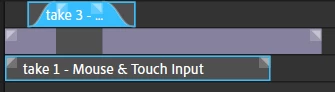
I delete old takes that are no longer active. They just clutter things up - once you are sure you like the new take of course!




 AdChoices