
nlemonc
Known Participant
March 26, 2018
Answered

Dragger behavior stopped working

  • March 26, 2018
  • 1 reply
  • 1724 views

Hello,

This puppet's left arm was not moving the way I wanted, so I removed the sticks and handles, then put them back. For some reason, the dragger now won't work. For either arm. I closed Character Animator and reopened, it still wouldn't work, so I closed the program and restarted my computer. Still no go.

I'm sure there is something simple that I have overlooked, but I've never had this happen before. Any help is greatly appreciated.

https://drive.google.com/file/d/1GqSvgqSiQteEByQJPMss228E-9TViyvR/view?usp=sharing

Thank you,

Nancy
This topic has been closed for replies.
Correct answer alank99101739

Well, I actually enjoy debugging puppets because of the breadth of puppets I get to see! I must say, I was not expecting that one! ;-)

Some suggestions:

* You might want to use "+Head" to make the head an independent group - then the head will tilt etc without the body moving so much

* You might want to set the "Head Position Strength" to something low, to keep the head attached to the body (e.g. zero)

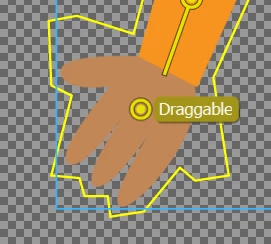
* You have handles on the hands, but they are missing the "Draggable" tag. Add that tag (or add new draggers) and it all works (click on handle, then click on "Draggable" in the tags)

The funny thing is sometimes the character is keeping his eyes closed for extended periods of time - I think the light is not very strong at my desk so the face recognition is getting it wrong. But it really looked like he was concentrating rather hard... which given the rest of the puppet was making me feel... a little uncomfortable...  But others will have to download the puppet if they want to understand!  ;-) ;-) ;-)

1 reply

alank99101739
Legend
March 27, 2018

Tried to download the file in case something easy, but it came up with "permission denied".

nlemonc
nlemoncAuthor
Known Participant
March 27, 2018

Sorry! I had set permission to anyone with link could access...I just saw your email so you should have access now.

Thanks!

alank99101739
alank99101739Correct answer
Legend
March 28, 2018

Well, I actually enjoy debugging puppets because of the breadth of puppets I get to see! I must say, I was not expecting that one! ;-)

Some suggestions:

* You might want to use "+Head" to make the head an independent group - then the head will tilt etc without the body moving so much

* You might want to set the "Head Position Strength" to something low, to keep the head attached to the body (e.g. zero)

* You have handles on the hands, but they are missing the "Draggable" tag. Add that tag (or add new draggers) and it all works (click on handle, then click on "Draggable" in the tags)

The funny thing is sometimes the character is keeping his eyes closed for extended periods of time - I think the light is not very strong at my desk so the face recognition is getting it wrong. But it really looked like he was concentrating rather hard... which given the rest of the puppet was making me feel... a little uncomfortable...  But others will have to download the puppet if they want to understand!  ;-) ;-) ;-)