

Participant
August 8, 2022
Answered

Edited Character not display properly

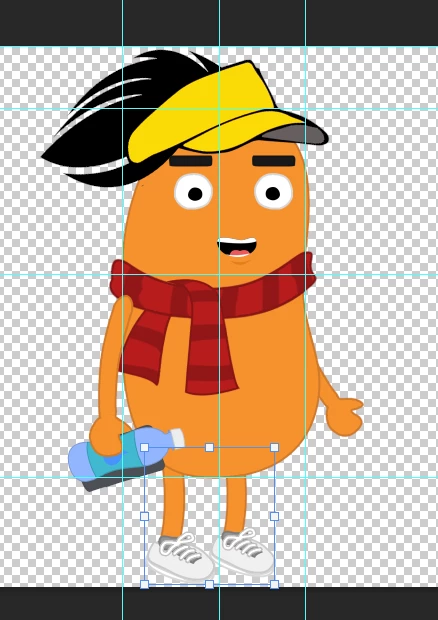
This is my edited character in PS :
 

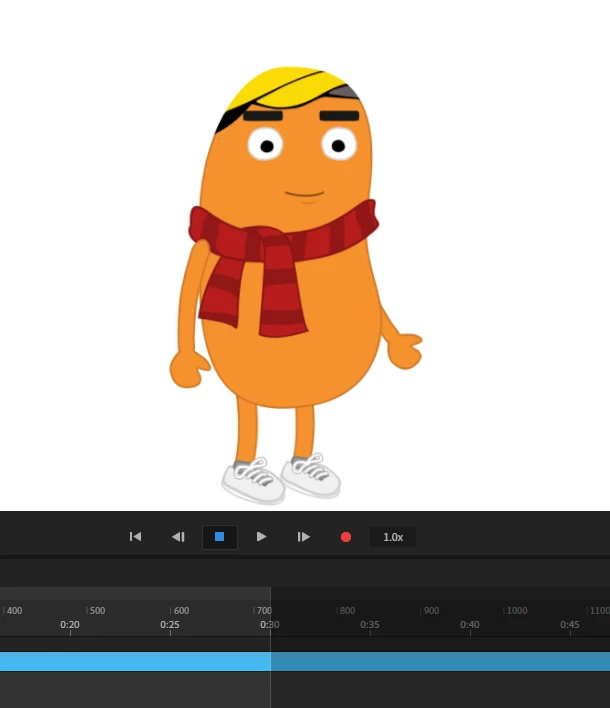
After i saved and open in CA, it looks like this, may i know why it doesn't display correctly as in PS?

This topic is closed to new replies. Start a new post to keep the conversation going.
TheOriginalGC
TheOriginalGCCorrect answer
Community Expert
August 8, 2022

I was looking at a similar model created from Puppet Maker in PS and I noticed that the head and torso are using a color overlay effect. On what layer are you putting your hair and hat images? They will need to be on a separate layer above the head and torso layer or else they'll get masked.

5 replies

oksamurai
Legend
August 9, 2022

My guess is there is a clipping mask in place from the original artist (this looks like the Blobby template?). If you see an arrow like this, select it and go to Puppet > Release Clipping Mask. That's what it looks like is happening anyway...

Translate
TheOriginalGC
Community Expert
Community Expert
August 9, 2022

Yes, it's Blobby. 

Translate
TheOriginalGC
Community Expert
TheOriginalGCCommunity ExpertCorrect answer
Community Expert
August 8, 2022

I was looking at a similar model created from Puppet Maker in PS and I noticed that the head and torso are using a color overlay effect. On what layer are you putting your hair and hat images? They will need to be on a separate layer above the head and torso layer or else they'll get masked.

Translate
AE NewbieAuthor
Participant
August 15, 2022

yes you are right. i just put it in the wrong folder hierarchy. now its fixed.

Translate
TheOriginalGC
Community Expert
Community Expert
August 8, 2022

How does the rigging hierarchy look? Could you share a screenshot?

Translate
