
Participant
August 23, 2020
Question

Elgato HD60Pro and Sony a6600 input problems

  • August 23, 2020
  • 2 replies
  • 519 views

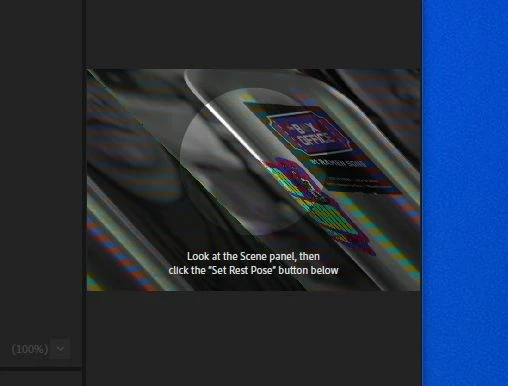
As the title states I'm having problems using this combo for video capture. I have decent rig and this combo works great in other programs. I cant seem to find any camera controls or settings in Ch. If there is a workaround I could use temporarily that would be great.


I see that @3411Jack has the same problem perhaps Elgato products are just unsupported ?


I have tried turning it off and on again.


It looks like the bottom right is chopped and added to the left side.
AMD Ryzen 7 3700x

32GB DDR4 3600MHz RAM

Nvidia GTX 2770 Super 

Windows 10 Pro Version 1909 (Build 18363.1016)

This topic has been closed for replies.

2 replies

Harvey Withington
Participating Frequently
August 25, 2020

I've got a Sony A6400 with an Elgato Camlink and it is working.


I think I had a similar issue out of the box, as your screenshot looks familiar. I believe changed the HDMI output settings on the camera to get it working. Can you try dropping it down to 1080p HDMI output from the camera? 

Participant
August 26, 2020

I had the same idea. I figured maybe it couldnt handle 4k/2k HDMI output. I lowered it to 1080p and 1080i @24p/60p. I decided to actually try every setting I could related to resolution and HDMI output. I'm going to try a different HDMI cable. When the cable comes I will try once more going through HDMI options. I'm trying to figure this out asap so my wife can teach her students in more captivating ways. If you have any other ideas to send me down I would greatly appreciate it. Thanks for responding. 

Inspiring
August 24, 2020

We don't have one of those on hand to test with. I'll work on getting one so we can reproduce in house. In the meantime, the workarounds aren't great. Since you're on Windows, if OBS can take the Elgato, you should be able to use the OBS Virtual Camera output as a camera input in CH, but I'm not sure I've tested that. 

Participant
August 26, 2020

I'll try and see if I can do what you're sayin in OBS. Only problem is I plan on using obs for two other inputs and streaming at the same time. Doesnt hurt to try.