

Participant
August 20, 2020
解決済み

Error

  • August 20, 2020
  • 返信数 2.
  • 744 ビュー

When working ....it shut down due to power failure...now the project file not opening ....it showing this error...
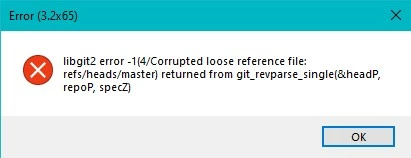
is there any solution for this? or I've to work from scratch again..

このトピックへの返信は締め切られました。
解決に役立った回答 David Arbor

Uh, oh. That I don't know how to fix. Was Photoshop in the middle of saving when the power went out? Unless there's a backup of the PSD file, I'm not sure what can be done. 😞 


DT


I've seen a couple solutions to this error before. One of them is opening the PSD in Illustrator, then saving it back as a PSD, making sure to check the option to "Preserve Layers." Another is using a PSD recovery tool. Here's one recommended in another forum post: http://telegraphics.com.au/sw/product/PSDRecover

I've never used it so I can't offer any advice or even a recommendation that it works, but some people seemed to have success with it. I would try the Illustrator method first.

返信数 2

Community Manager
August 20, 2020

I may be able to fix that if you send me a download link for a zip file containing the Ch Data/repo.noindex subfolder of the project. That particular message is usually a rather mild sort of damage.


Dan Tull

Adobe Character Animator Team

Arunava Roy作成者
Participant
August 20, 2020

That will be very nice..here it is..

Zip link 

Community Manager
August 20, 2020

If you write 9472c3e561183772fada757f02b2dc233c9e6d71 into the file "Ch Data/repo.noindex/refs/heads/master" the project should open again. This forum is being annoying and not letting me post the file with any regular extensions. 

🙄
Here's a link if you'd prefer a file to drop in vs editing the existing one: 

https://www.dropbox.com/s/qmge2w1l1n37ury/master?dl=0

DT

Inspiring
August 20, 2020

What happens if you create a new project and drag this .chproj into it?

Arunava Roy作成者
Participant
August 20, 2020

It does'nt work. Same error.