
christined71673570
Participant
Jan 15, 2023 12:41 AM UTC
Question

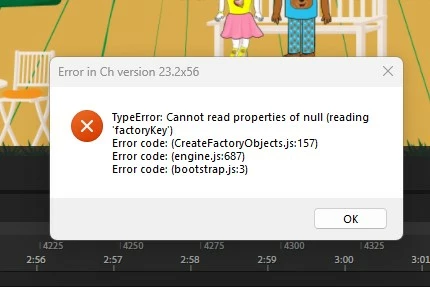
Error code, all assets missing from timeline but video still plays, cant edit it though

Error is in the screen shot. I'm using Beta. I updated it a few weeks ago. When I got the error, I updated the beta again,just now, but it didn't help. I tried a SAVE AS and the same error came up.
This topic is closed to new replies. Start a new post to keep the conversation going.

2 replies

christined71673570
Participant
Jan 15, 2023 12:42 AM UTC

I went back to an earlier saved version and I think it's okay now but don't know why this happened. I was duplicating music tracks and splitting them when it happened. I wish I could control fade in and out of audio tracks inside CA.

Translate
TheOriginalGC
Community Expert
Community Expert
Jan 17, 2023 2:22 PM UTC

Alas, the volume in CH is set to be the same for the entire timeline - it cannot be changed at one point and the restored at another. Currently, you can use Adobe Audition to edit your audio tracks, but it's not ideal.

Translate