
Participant
February 13, 2020
Question

Error occurs with puppet and scene when working on another computer

  • February 13, 2020
  • 1 reply
  • 2179 views

Hello, I hope someone can help me. 

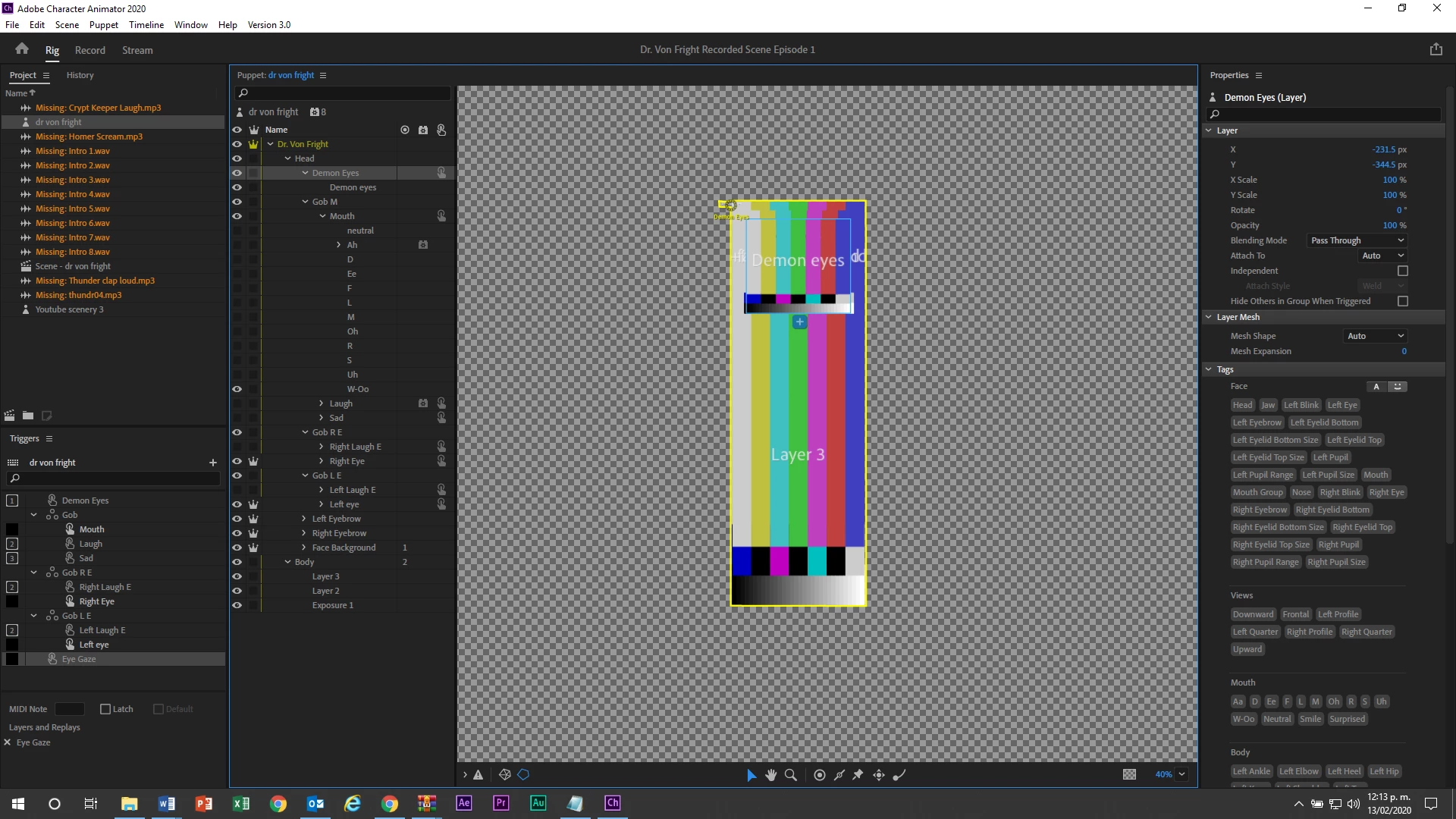
I'm trying to work with a puppet and scene I already have in another computer. This error appears (image) not letting me progress. I also tried to import it to after effects and premiere pro to edit and rendering and the same things happen with the color lines. 


PLEASE HELP, thank you in advance.
 

This topic has been closed for replies.

1 reply

ElectroPuppet
Inspiring
February 16, 2020

Looks like your computer isn't finding the puppet file? That can happen when you move the source puppet or access from a different machine. Try selecting the puppet on the left, then over on the right of screen under 'Puppet' you should see the path Character Animator is trying to use to locate the puppet. You may need to click on that and remap where your puppet is located. 

If you are working on various machines, might be easier to export the puppet (if the puppet is locked-off).


Hope that helps.

Participant
February 19, 2020

Hey Smidio, 


Thank you so much for answering. Sorry it took me so long to answer back. I put a scene I recorded with my puppet in one computer into a USB; when I open that file in a another computer it shows the error you saw in the image. I tried to remap the path CH is trying to use to the file located in the USB, but for some reason It appears as if no CH file exist in the USB, which obviously does (as you can see in the image). I hope you can help me, brother, I'm desperate. 

ElectroPuppet
Inspiring
February 19, 2020

Hard for me to say Jo5eph, as these images are really small. I think you're looking at the Character Animator generated project file(s). That isn't your puppet. You need to move your original artwork (or .puppet file) onto the usb as well. Then show Character Animator where to get the artwork from.

- Or show Character Animator the path on your PC where the original puppet is...


I always create a folder with the puppet name. Then in that I place the Character Animator Project and orginal artwork. Makes it easy to find.


File structures and naming are really important, especially when you are working with others. I just created a post explaining how I structure my Adobe Character Animator work for creating webseries. Good practice to get into! Hopefully it can be of some help!! (Link below).


Good luck!


https://www.electropuppet.com/creating-a-file-structure-in-adobe-character-animator/