
mrincon88
Participating Frequently
May 23, 2017
Answered

Error reading past end of file, Error code: (EventGraphs.js:112)

  • May 23, 2017
  • 2 replies
  • 5112 views

While working in character animator, working with the visemes on my animation and I received a pop up error message that states the following:
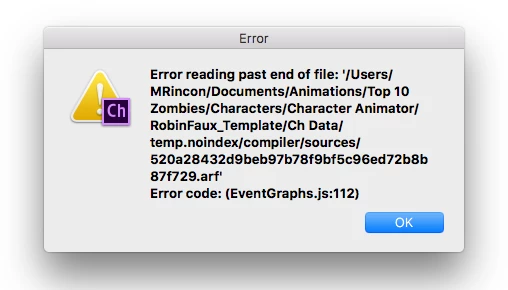
Could you please help me understand why I would be getting this? I have tried restarting the program, but every time I try to open my project up again- I still receive the same message. The recording and visemes show, but when I try to play or scrub they don't work.

    This topic has been closed for replies.
    Correct answer Jeff Almasol

    Thanks, Margarita. I was able to download the project and artwork file for Anita Lissen.ai (I didn't see the AI files for RobinFaux and Vera Sharpe, but am assuming you were only asking about the Anita Lissen scene). I do see a "Invalid file start code. Error code: (EventGraphs.js:121)" error, which is slightly different than your original error message. Is that what you're seeing there? I'll need to check with the development staff what could be causing it and to see if there's a workaround.

    Can you also send me the 2_Antivirus_01.wav file?

    Did you do a Compute Lip Sync from Scene Audio from that file, then just adjust viseme timing before you encounter this error?

    Thanks.


    One possible workaround... hold down the Option key as you click the Refresh button in the lower-right corner of the Scene panel. Does that at least make the errors stop appearing?

    2 replies

    Jeff Almasol
    Adobe Employee
    Adobe Employee
    June 1, 2017

    Hi Margarita... I branched your additional playback and sound issues to a new thread just to keep issues separate. Playback sometimes doesn't work, lose sound while scrubbing

    Also, you might want to remove any personal contact info from the signature of your posts here. Our forum moderators remove it otherwise. Thanks.

    Jeff Almasol
    Adobe Employee
    Adobe Employee
    May 23, 2017

    Did this appear while in the middle of an session, or when you tried to relaunch the application or open the project?

    Is your RobinFaux_Template within a folder that gets automatically backed up or synced (e.g., Dropbox, CrashPlan, etc.)?

    I'll ask around here to see about possible causes and workarounds.

    Jeff Almasol
    Adobe Employee
    Adobe Employee
    May 24, 2017

    Would it be possible to share your project folder and assets? Just archive them into a .zip, then send a shared link (via Dropbox, Google Drive, etc.) to me to investigate? You can send the link via DM here.

    Thanks.

    mrincon88
    mrincon88Author
    Participating Frequently
    May 24, 2017

    Hi there,

    I received the message when the program opened back up. For some reason, my project decided to work again… not sure why all of a sudden. But I am sending you the project saved from another machine that will show you the error message, so we can find out exactly why I received the error message and possibly why it started to work again. Below is the link for google drive with a .zip file. Let me know if you have any issues.

    https://drive.google.com/open?id=0B0xzkkZpR9OeQkJVeTg4c3NjdUE]

    Thank you!

    Margarita