


Inspiring
March 2, 2023
Answered

Export to MP4 stopped working today

  • March 2, 2023
  • 3 replies
  • 602 views

I have been exporting to MP4 from Character Animator for weeks.

Today, I go through the same steps I always have, and this window never changes:
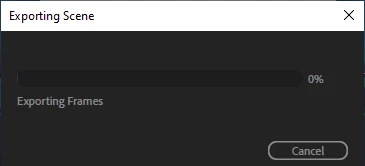
When it claims it is done exporting, the thumbnail looks like this:

When I double-click it, it is a black, one-second video.

I haven't changed any settings in Character Animator since yesterday.

Any idea what has happened?

Thanks!

This topic has been closed for replies.
Correct answer TheOriginalGC

In the quick export window, the scene is showing to be less than 2 seconds long. Double check your timeline to make sure that it covers the entire length of the scene. The export only covers the selected region of the scene.

3 replies

TheOriginalGC
Community Expert
Community Expert
March 3, 2023

Have you tried exporting to Adobe Media Encoder? It might be able to work its way around whatever is going on. At the very least, you'll see a preview of the video to double check the content. How long is it supposed to be?

Inspiring
March 3, 2023

Thank you so much for responding!

I have discovered that the problem is with one scene/project, not all.

The scene is 76 seconds long.

On my system, which meets the minimum requirements Adobe has posted, it takes 90 to 120 minutes to Quick Export a scene this length to MP4.

I started Adobe Media Encoder on this video, and the pop-up window said it would take about 8 hours to export it to MP4. 

So, I will initiate the Adobe Media Encoder at the end of my day today, and let it run over the weekend.

Thank you for reminding me!

TheOriginalGC
Community Expert
TheOriginalGCCommunity ExpertCorrect answer
Community Expert
March 3, 2023

In the quick export window, the scene is showing to be less than 2 seconds long. Double check your timeline to make sure that it covers the entire length of the scene. The export only covers the selected region of the scene.

Inspiring
March 3, 2023

More information. Here is the Quick Export window:


I am dead in the water until this is resolved. I would appreciate some help.

Thank you!

Inspiring
March 2, 2023

Just to add to my original post, I never change any default export settings.

I followed these 5 steps like I always do, and it isn't working:

https://helpx.adobe.com/adobe-character-animator/using/export.html