


Participant
April 11, 2024
Answered

exporting

  • April 11, 2024
  • 1 reply
  • 1052 views

hi, I have recently made an animation and i am unable to export the whole scene. when I open the exported video, it is not even a second long even though the orignal is almost 30 seconds long. I have been trying to export the whole video for very long now. has this happened to anyone and does anybody know how to fix this problem???

Correct answer TheOriginalGC

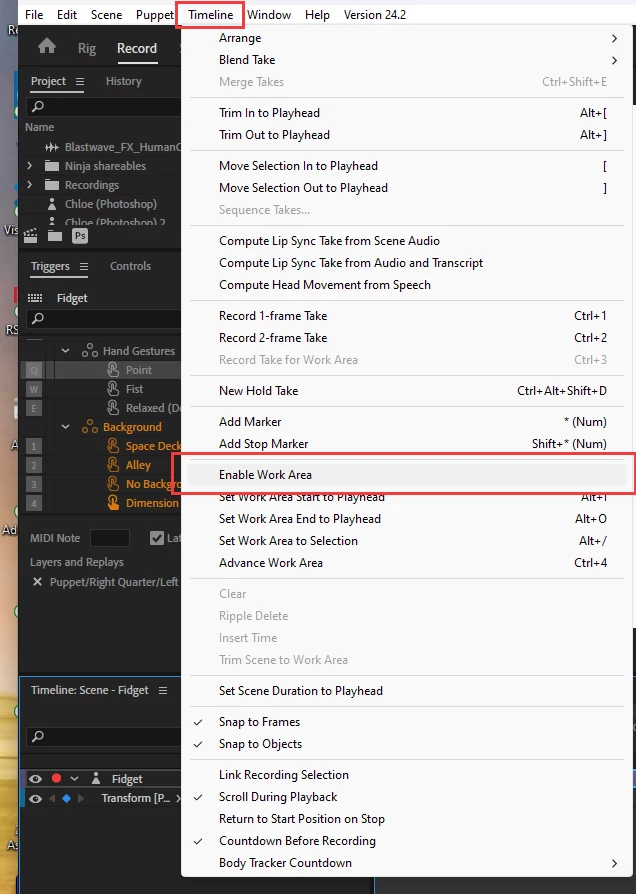
I found the timeline but couldn't find the enable work area.


Select "Timeline" from the top menu and from the drop-down, make sure that "Enable Work Area" is NOT checked. (See below).

1 reply

TheOriginalGC
Community Expert
Community Expert
April 11, 2024

It could be that you only have a portion of the animation selected on your timeline. Click and drag the grey bar at the top of your timeline to include all of your animation.

09091212Author
Participant
April 11, 2024

all the portion i want is selected, i tried to move it around and adjust it but still does not work. thank you for your reply tho.

oksamurai
Legend
April 12, 2024

How are you exporting? Through Adobe Media Encoder or just the share icon? It looks like CH is saying your scene is 30 seconds long, but my guess is the export is cutting it off for some reason.