
Known Participant
May 31, 2017
Answered

Exporting adobe character to Adobe premiere

  • May 31, 2017
  • 3 replies
  • 5856 views

Here's the story.

I have a finished character project that I would like to put in Adobe Premiere.

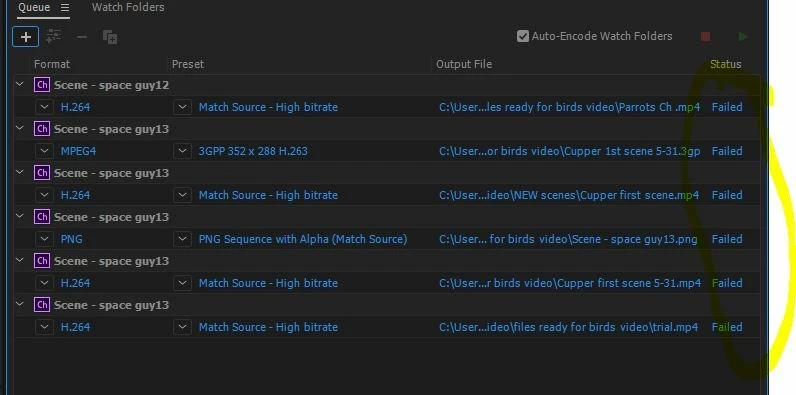
I do export by adobe media Encoder and then it fails to change the format.

I talked to support and they say it's character's file and it just won't work.

Adobe support did a png and wav file ok but I don't really like that. It's too many files and I can't change the duration of the length because of all the files.

Thanks for any help.
This topic has been closed for replies.
Correct answer Jeff Almasol

What are your versions of Character Animator CC and Premiere Pro CC? Are they the latest 2018 versions (i.e., version 1.1.1 for CH and version 12.0.1 for PR)?

Premiere Pro CC 2018 can import a .chproj file from Character Animator CC 2018 so that you can select a scene to import. You can also drag the scene from Character Animator CC 2018's Project panel and drop it into Premiere Pro CC 2018's Project panel. This is standard Dynamic Link usage, as described in Adobe Character Animator Help | Export: Render a movie or broadcast a scene live

If you have different versions of Character Animator and Premiere Pro (e.g., Character Animator CC (Beta) and Premiere Pro CC 2018), that won't work via Dynamic Link.

I've reached out to our Support staff to clarify. Sorry about any confusion.

Thanks.

3 replies

Jeff Almasol
Adobe Employee
Adobe Employee
June 1, 2017

And just to confirm, you are using Character Animator (Beta 6, version 1.0.6 as shown in the About screen) and Premiere Pro CC 2017 (11.1.1)?

Known Participant
June 1, 2017

This is my about.

So far today the AME is working and changing my projects into MP4 files. But...... Character is not working properly. I want my background to be transparent and so I changed to transparent in the scene but when the MP4 makes the background black.  I'm not sure what to do. I shut down Ch and then rebooted and I've tried 3 video and all the backgrounds are black.

Do you have ideas?

oksamurai
Community Manager
Community Manager
June 1, 2017

Video export will always make the background black, alpha isn't supported with mp4 or other AME formats.

PNG sequence + WAV or dynamic link are the ways to do that.

Community Manager
June 1, 2017

If you would like to use your CH scene in Premiere, it's probably best to just import it directly into Premiere like oksamurai said(though it appears you're having issues with that). Of course, you should be able to export a movie in AME and import that into PR, but that should be an optional step. And again, it appears you're having issues with that as well.

Adobe's support shouldn't have told you it just won't work. It's possible there's a bug interfering with your workflow. If that's the case, we'd like to figure that out so we can fix it.

Dan R.
CH QA

Known Participant
June 1, 2017

Hi Dan,

I did put the ch scenes directly into premiere and they worked at first. When I closed the program and came back the next day, all the ch files were offline. I did this twice with the same results. I would like to use this method. It's one less step then to change the format.

So I should be able to use a ch file right into premiere? 

oksamurai
Community Manager
Community Manager
May 31, 2017

Have you tried dynamic link with Premiere? If you open Premiere, import the .chproj file, and select the scene, does it show up in your Premiere assets? That's how I would personally do it.

Jeff Almasol
Adobe Employee
Adobe Employee
June 1, 2017

Also, in AME, what's the specific error message that appears when you click that "Failed" link?

And, if you quit AME, Character Animator, and other Adobe apps, wait 30 seconds (so that the background dynamiclinkmanager process quits as well), then relaunch AME, does retrying rendering of the queued Character Animator scenes work (unsure if you need to duplicate the queued item first or not)?