Participant
November 15, 2021
Answered

Exporting doesn't work

  • November 15, 2021
  • 1 reply
  • 669 views

Hi!

I am trying to export a scene but it's not working... I don't know why. Please find attached the error reported. I am French. If I could have a French response it would be great! Thanks a lot! 
How can I contact directly Adobe assistance by the way? The SAV is like a fortress... 

This topic has been closed for replies.
Correct answer Larry Sullivan

Sorry... I didn't understand the reference. I use AME version 22.0. I asked a colleague to try and the export is working with his device. I think I have different parameters or graphic board, which can explain that it doesn't work on my device. But there has been 2 years I am using this PC and Adobe CC, and I had no problem until now.


Another workaround is to try disabling some (or all) of the hardware decoding/encoding settings in AME's Media preferences:
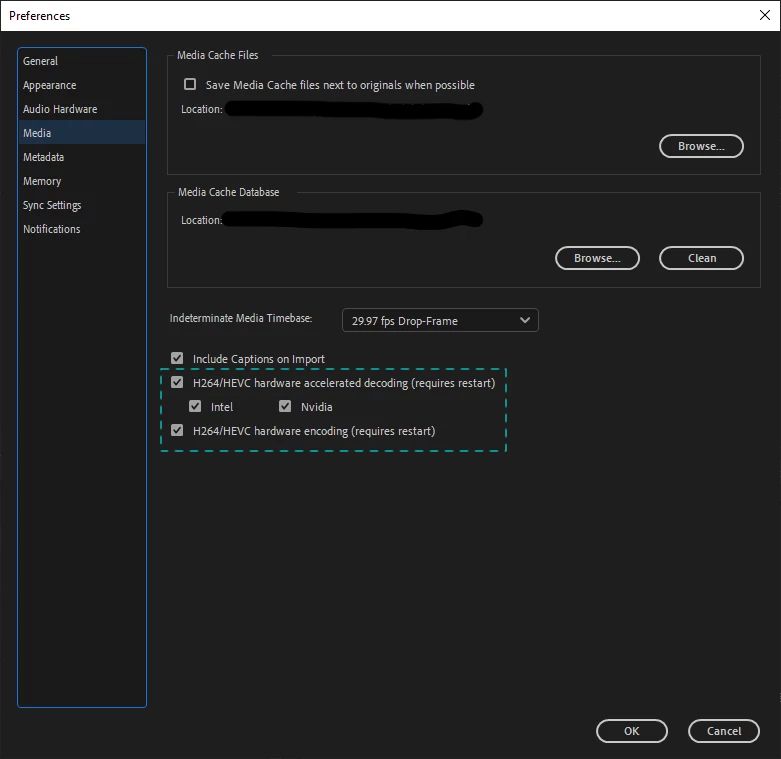
If that works then it might be related to your GPU card(s).  Also check if there are updated drivers available online.

1 reply

CoSA_DaveS
Adobe Employee
Adobe Employee
November 16, 2021

That's a problem with AME. What version of Ch and AME are you using?


As a workaround, you can export to PNG/WAV and convert to MP4 in Premiere Pro.


=========


C'est un problème avec l'AME. Quelle version de Ch et AME utilisez-vous ?


Pour contourner ce problème, vous pouvez exporter au format PNG/WAV et convertir en MP4 dans Premiere Pro.

Participant
November 16, 2021

Thank you for your answer 🙂
Where can I find the version of AME I am working with? I use the latest version of Ch (22.0). If not possible otherwise, I'll try to convert PNG/WAV in PremierePro.

Participant
November 16, 2021

Sorry... I didn't understand the reference. I use AME version 22.0. I asked a colleague to try and the export is working with his device. I think I have different parameters or graphic board, which can explain that it doesn't work on my device. But there has been 2 years I am using this PC and Adobe CC, and I had no problem until now.
