Inspiring
December 18, 2017
Answered

exporting impossibly slow

  • December 18, 2017
  • 2 replies
  • 2294 views

hey guys,

when I try to export a short animation (25sec) as QuickTime or anything it gave me a crazy remaining time of about 45 Hours!!!

I have a fairly efficient computer with no virus, no problem to export 10min videos with a lot of effect from Premier Pro (take 10 to 15min).

The PNG and WAV directly from Ch are faster but still really slow (30min).

I haven't seen anyone having that issue on the forum

Hope you guys can help me

cheers

This topic has been closed for replies.
Correct answer yannickr32356711

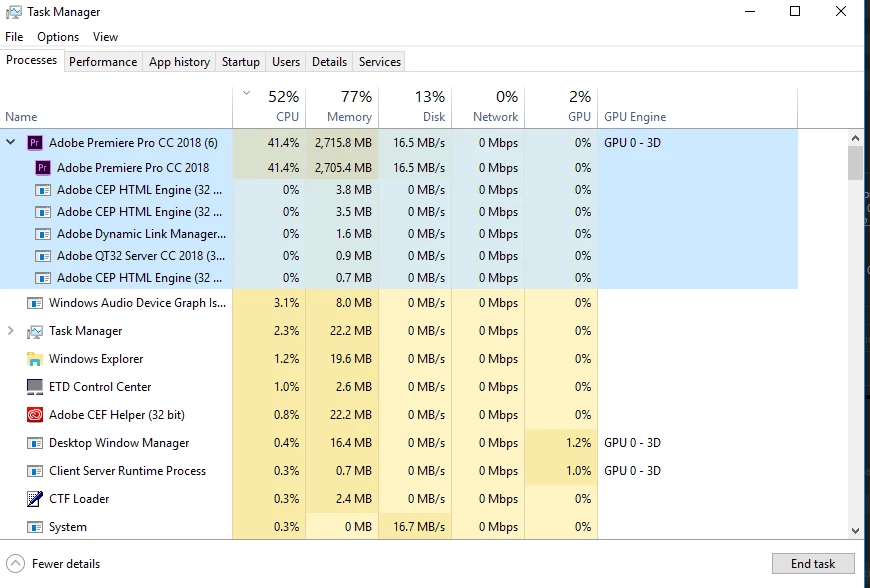
Well, at rest the task manager shows: CPU 6%        Memory 52%         Disk 0--6%    Network 0%          GPU 0%

here is a screen shot of the task manager when I try to export (Pr)
I use H264 with preset "match Source - High bitrate"   Use maximum Render quality (try uncheck it but same)

If we trust the task manager everything works well but that causes a deadly slow down in my entire computer every single click takes forever and this is driving me crazy since I just bought it especially for this kind of work. No virus I use another laptop for the internet.

there has been a windows update last week yes.

Someone told me (from adobe support chat) that there is a playback performance issue with Radeon cards, could it be the reason?

will try to uninstall the update and reboot if it doesn't clear it out.


SO

I reboot my PC and it seems to behave like before, I notice while doing my back up that my exported scene was 72GB which is... surprising. I don't know how I manage to reach this size but I guess it was the problem, probably in Pr too because the empty space in my computer went from 450GB to 800GB and I do not have lost any files, I don't know how that could be possible but something should've create hidden useless files in my projects.

Still a mystery but the issue is solved.

Thank you so much, you are doing a great job, it is not in every company that the customer service is this good

2 replies

DanTull
Adobe Employee
Adobe Employee
December 19, 2017

That's pretty surprising. One thing that occurs to me is that the headless rendering process that talks to AME doesn't share the scene caches with the main process, so it does need to re-prepare the puppets that are in the scene before it renders any frames. That might cause the estimates to be rather inaccurate toward the beginning. Does your scene have some fairly complex puppets in it?

Also, what scene framerate and resolution are you targeting?

DT

Inspiring
December 19, 2017

DanTull thank you,

I am new to Ch and don't really know what a headless rendering is (English is not my first language as well).

My puppet is really simple (draggable hands, one cycle layer triggered once, face behavior).

30fps

I made the scene to maximum height and width because I made my puppet really big in Photoshop so it can be scale down rather than up BUT when I scale down in Ch for recording then it render blurry at exporting and appear tiny in Premiere. BTW if you had a solution for that you'll save my life as well. This is my first professional project!

Thank you very much

Inspiring
December 19, 2017

(I forgot to tell you that the time it gave is not really inaccurate IT DOES REALLY TAKE 25 TO 30 HOURS)

TDFAP
Inspiring
December 19, 2017

Have you actually tried the 45 hr render? I had one render that calculated initially as over 100 hrs, but after about 15 min, it re-adjusted to around 30 min, (which was the actual time it took.) I had planned to let it render overnight, but when I checked it before bed it was almost done. Just curious if your render would do the same?

Inspiring
December 19, 2017

thanks for your reply

TDFAP Yes I have actually tried to let it render and it also re-ajusted but to 25Hrs not 30min
