
Participant
August 26, 2021
Question

Eyes only move with head in webcam, not eye direction?

  • August 26, 2021
  • 2 replies
  • 387 views

Hello!


I used OkaySamurai's suggestion for large pupils for my puppet and cut out eye holes in my face. This worked to make the eyes move less drastically, and more naturalistically, but now the eyes only move when I move my head? It's not that big of a deal, but since the body also sways everytime I move my head, it's a bit strange.
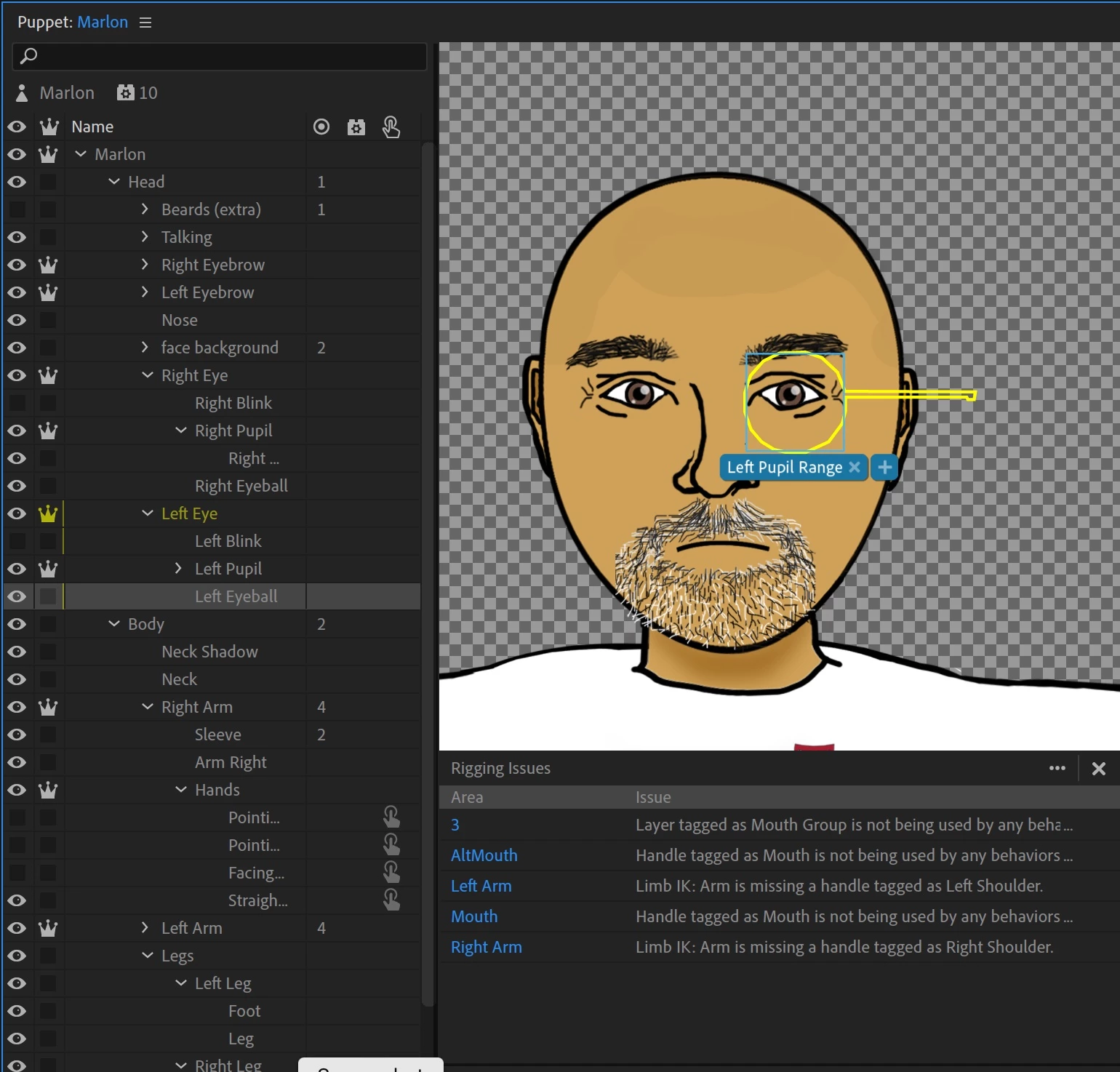
I am sure it has something to do with my layers. The "Pupil" layers also include the whites (which I believe OkaySamurai recommended in his video?), and the "Eyeball" layers are just a larger white circle underneath to indicate range. Any suggestions would be greatly appreciated. Thank you!


Also, if you happen to see anything else weird based on the errors panel, please let me know!

This topic has been closed for replies.

2 replies

TheOriginalGC
Community Expert
Community Expert
August 27, 2021

You appear to have 2 tags attached to your face. What are those? Are they necessary? Remember, you should only have one "head" tag. Also, what is the extra shape sticking out from the left eyeball shape? (Am I correct in assuming that the "Left Pupil Range" is your left eyeball?

qkjnodvAuthor
Participant
September 2, 2021

Hello!
Thank you both so much for your answers! They were both really helpful. Deleting the extra head tag helped me get eyefunction back (thanks to TheOriginalGC). I had already seen the Extra Ordinary website, but it was helpful taking another look, because I realized that I did, indeed, need to mask, and my layers were not in order, so thank you as well to alank99101739.

What I ended up doing was cutting out the white part around the pupils completely and then gradually making the white space in the Left and Right Eyeballs smaller and smaller on Photoshop until the eye movement looked naturalistic. Actually, the range ended up being a lot smaller than I thought--just slightly taller than the eye opening, actually not all the way over to the right and left. I made a "White Eye Background" to lay underneath to make sure there was no see-through parts visible.

Thank you both so much again! I think that things look good now!

alank99101739
Legend
August 26, 2021

Make sure the eyeball (pupil range) layer is much bigger than the pupil layer. It is fine to include eye whites in the pupil layer, but you will need to make the range layer bigger as well to compensate. 


https://extra-ordinary.tv/2018/04/21/debugging-character-animator-eyess/ has more explanation if helpful.