
House of Sugars
Inspiring
November 19, 2017
Answered

Front view distoring

  • November 19, 2017
  • 2 replies
  • 1952 views

I'm re-doing my characters and making test renders for my voice actors, and I had a very successful test with the first one, but this 2nd one, the head just keeps distorting in front view and I can't figure out why Prince.zip - Google Drive

Here's the more successful one rendered out KingTest.mp4 - Google Drive
    This topic has been closed for replies.
    Correct answer oksamurai

    Prince.puppet - Google Drive


    Two things:

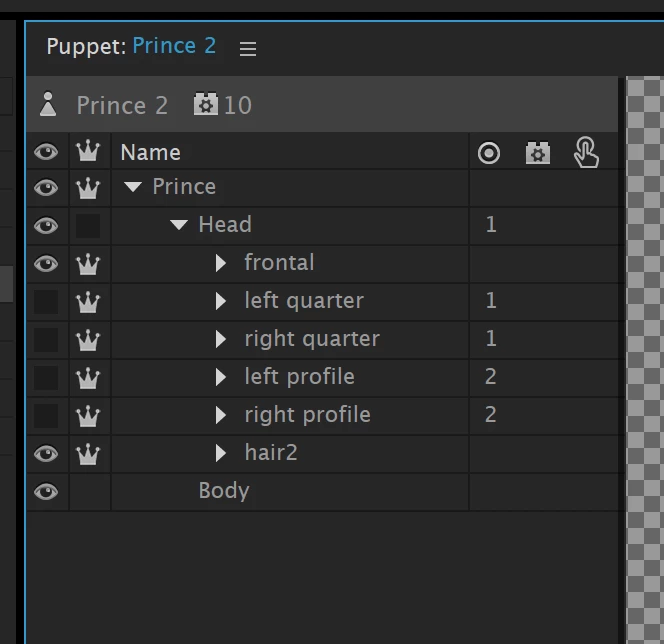
    1. Set up your independence like the image below. You need a crown in front of Prince and each Head view.

    2. All the non-frontal views don't have blink layers, so they collapse on themselves with your eyelids. They either need blink layers in each eye group or Face > Eyelid Strength needs to be 0%.

    2 replies

    oksamurai
    Legend
    November 21, 2017

    I can't find the issue in the project you posted, not sure what to look at. A video or .puppet file would be helpful.

    Usually head distortion is from not having blink layers, improper use of independence, wrong attach style, or a rogue tag keeping it fixed in place.

    Vidya Sagar
    Participating Frequently
    November 21, 2017

    Hi SugarTallerino,

    Thanks for posting in Adobe Forums. Could you please share us a video recording of the distortion in front view to understand the issue better.

    Thanks,

    Vidya.

    House of Sugars
    Inspiring
    November 21, 2017

    What happened when you opened this Prince.zip - Google Drive ? Did it work for you?

    oksamurai
    Legend
    November 21, 2017

    I see a bunch of puppets and scenes but I couldn't figure out which one had the issue, and several seem to be missing the artwork files. This is why we recommend .puppet files instead of projects - the artwork + rigging are always together.