Participating Frequently
December 3, 2018
Answered

Full preferences list unavailable

  • December 3, 2018
  • 11 replies
  • 682 views

Hi all

I've recently gone from a humble student to employee for a new business and will be getting to know Character Animator.  It's very exciting and I have already produced a couple of scenes, but there are some bugs I've had to move around and based on my searches, generally involving either an occasional freeze or a crash, but the occasional ones don't bother me so much.

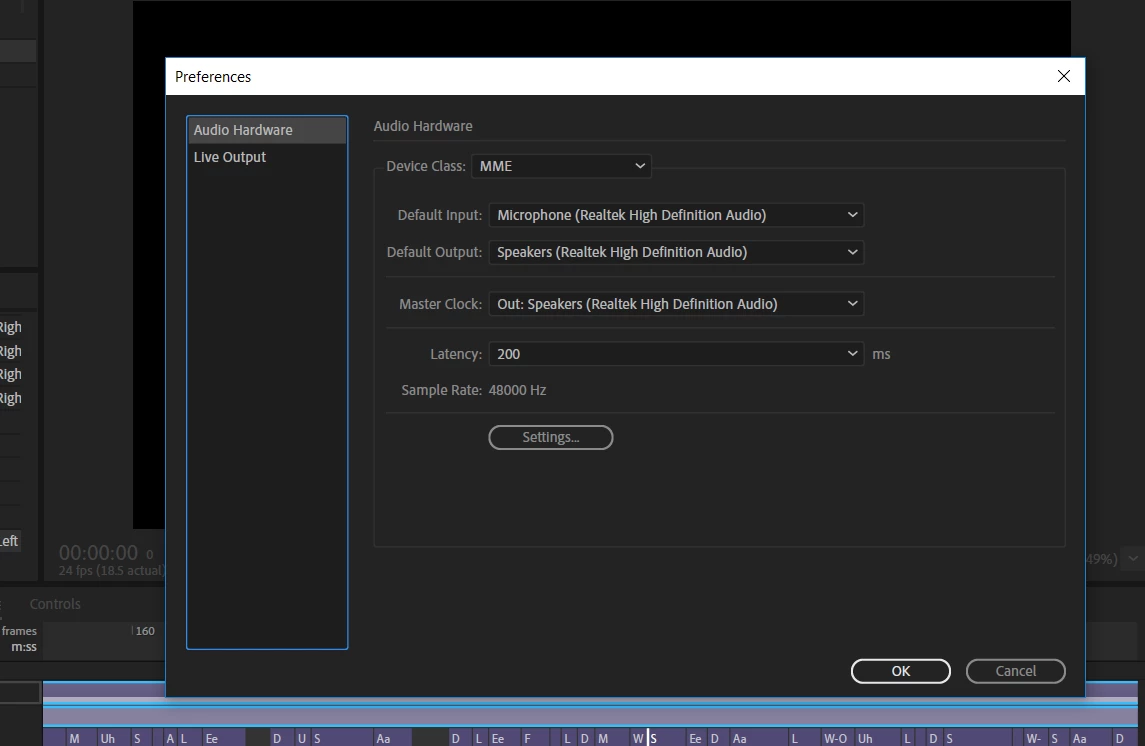
I am running CA from my laptop, an MSI Apache Pro, 16gb of ram with a NVIDIA gtx 1060 (8gb dedicated ram) graphics card, so I don't think I have insufficient hardware for the job, but before I can know for sure I was hoping I could ask for some help.  However I believe in order to know for sure, some of you may ask to see my preferences, but I do not have access to the full list (please see the attached image for details).  I am currently using v2.0 of CA, I also ran as administrator with no success?

Just FYI, I only have a basic understanding of system specifications, though I'm guessing that will have to change soon, but just so you're aware, if you would be so kind as to help me out you might need to speak slowly to me through the keyboard in order for me to understand .

The issue i'm posting about has come with a new puppet I've been working with.  Every single time I make a change to him in the timeline, CA freezes for about 5-10 seconds with the (not responding) message at the top of the page, which is just too damn slow this early in the piece.  I thought to first try and check my preferences to see if I could allocate CA additional memory if needed, but that's where another obstacle has occured.

Could the problem be something to do with my adobe account?  Do I need to upgrade from student or something?

Thank you for your assistance

Regards

Sean

This topic is closed to new replies. Start a new post to keep the conversation going.
Correct answer DanTull

I think you're seeing the complete set of prefs. The reason there's only 2 sections is that the app is fairly young and also the team really tries to avoid adding tons of preferences unless they are really needed, so there aren't many of them yet.

The performance issue is still interesting. I'd be curious to take a look at the puppet (or the project) if it is one that you can share. Your hardware sounds fine. The 5-10 second stall per edit sounds like an issue that was improved in 2.0 relative to 1.5, but since you're using 2.0, I guess it is still present for some puppets.

I notice you have at least 2 physics behaviors. Does the puppet have a large number of behaviors? Does your scene have just the one puppet or several? Timeline edits do force a certain amount of refreshing, but a lot of that should be cached, so even the complex mesh that you mention doesn't seem like it'd be a cause unless the edits are somehow changing the puppet's rigging.

Anyway, if you want to share it, I can take a look to try to understand better, but it sounds like you have at least found some mitigations for now.

Thanks for the report -- DT

11 replies

alank99101739
Legend
December 3, 2018

How did you turn off physics visibility? I am not familiar with that setting.

Participating Frequently
December 3, 2018

When selecting your puppet in the timeline, I found all you had to do was scroll down toward the bottom of the hierarchy in the properties tab and they all appear at the bottom.  You can then just click the eye to disable the visibility of physics.  It made a big difference at least for me.

alank99101739
Legend
December 3, 2018

That sounds like a pretty decent computer. I don’t think its your hardware. I think its just CH is slow at times. But maybe the puppet you are using is complex? Not sure.

If you like, you can describe an exact sequence of steps in a new project using the sample puppets and I can try to repeat and compare timings on different machines...

Participating Frequently
December 3, 2018

Good news, just shrinking the viewfinder and turning off physics visibility significantly improved performance.  It's interesting, In regards to your last comment, I had only imported the character and lip-sync audio and from there on I was simply struggling with making adjustments to the phonetics, so I was barely into the start of the work day.

I also took a look at the rig itself as it wasn't my design and the map/mesh was vastly more complex than the last puppet, to the point that it almost completely obscured his face.  I'm thinking this+physics on/visible might have caused the problem.

In future, I think I'll turn physics off until needed for recording.

Just wish I knew why I can't see all my preferences.  I suppose I'll figure it out eventually.

DanTull
Adobe Employee
DanTullCorrect answer
Adobe Employee
December 3, 2018

I think you're seeing the complete set of prefs. The reason there's only 2 sections is that the app is fairly young and also the team really tries to avoid adding tons of preferences unless they are really needed, so there aren't many of them yet.

The performance issue is still interesting. I'd be curious to take a look at the puppet (or the project) if it is one that you can share. Your hardware sounds fine. The 5-10 second stall per edit sounds like an issue that was improved in 2.0 relative to 1.5, but since you're using 2.0, I guess it is still present for some puppets.

I notice you have at least 2 physics behaviors. Does the puppet have a large number of behaviors? Does your scene have just the one puppet or several? Timeline edits do force a certain amount of refreshing, but a lot of that should be cached, so even the complex mesh that you mention doesn't seem like it'd be a cause unless the edits are somehow changing the puppet's rigging.

Anyway, if you want to share it, I can take a look to try to understand better, but it sounds like you have at least found some mitigations for now.

Thanks for the report -- DT

alank99101739
Legend
December 3, 2018

What CPU (and how many) do you have? I have a 2 core machine which can be sluggish, but borrowing my son’s 6 core machine works better. But it does take a while when you re-rig the puppet At times. I think it relates to the complexity of the puppet, but I have never done any performance testing. Might be interesting to try some different puppets to see how much variation there is. Things like scene resolution I am sure make an impact too.

Participating Frequently
December 3, 2018

Hi Alan, thanks for the quick reply.

It's an i7 processor if that's what you're asking?  Just copied and pasted:

Processor Intel(R) Core(TM) i7-7700HQ CPU @ 2.80GHz, 2801 Mhz, 4 Core(s), 8 Logical Processor(s)

Hmm, it's weird, because he's actually about 2mb smaller than the other puppet, however he has a ton of physics behaviours attached.  Maybe I should turn those off? I'll try a lower resolution now...