


bobokirk
Inspiring
October 29, 2017
Question

Head Turns in CC2018 - "Swap Set"? How?

  • October 29, 2017
  • 6 replies
  • 1010 views

I'm liking the new features in CC2018, and see much improved workflows, etc., so thanks, 1st of all, for the work your folks put into this great product!
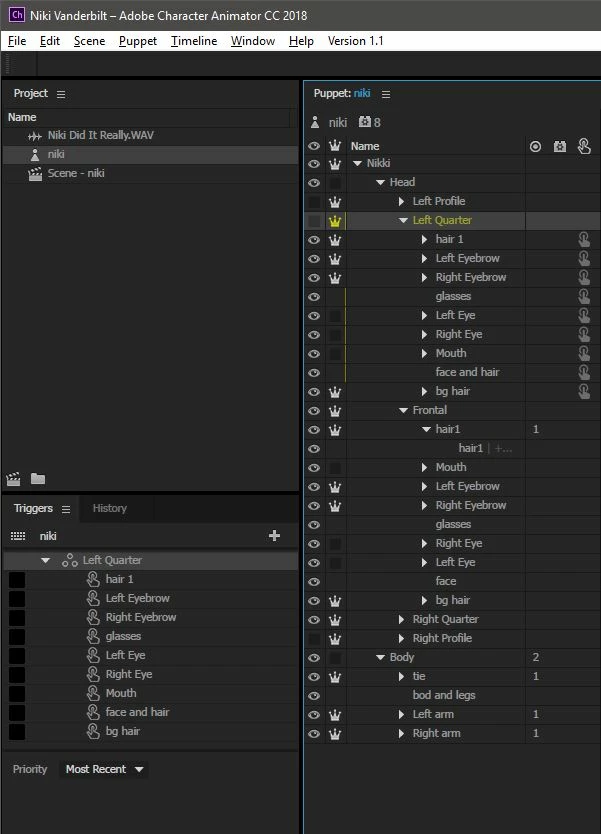
I'm now trying to set up my characters' head turns, but am having no luck with Triggers/Swap Sets.
I've got individual groups of 1/4 + 1/2 turns for each side (right and left), and of course a "frontal" group - all inside my "Head" group.

When I drag the "1/4 Left" group into my "Triggers" section, it sets up the group as Dave shows in the Tut.
When I add triggers to each layer in the group, I get no response in the scene.
Please help ....
    This topic is closed to new replies. Start a new post to keep the conversation going.

    6 replies

    bobokirk
    bobokirkAuthor
    Inspiring
    October 30, 2017

    This could ba simple as my needing to move the other head turns (the qtr turn, profile) folders out of the "Head" group.  Please let me know if anyone else has solved the Head Turns process in the CC2018 update.

    Thanks!

    oksamurai
    Legend
    October 30, 2017

    You're on the right track - check out how I reworked Wilk on http://okaysamurai.com/puppets.

    The issue, at least in the first screenshot - is that you're setting up the whole Left Quarter group as a swap set, when really all you need is it as a single trigger inside a swap set. But by default whenever you drag something into the triggers panel and it's a group, it turns into a swap set. So you're probably better off either making the swap set first and dragging it inside, or using the triggers column to add it as a new trigger instead of new swap set. Hopefully that makes sense!

    bobokirk
    bobokirkAuthor
    Inspiring
    October 30, 2017

    OK ... thanks so much brother!  It looks as if the entire "Head" group is the Swap-Set, and within that Swap Set I can assign each "Turn" a Trigger.  Is that what I see?
    Can't thank you folks enough - truly!