TylerBM
Participant
April 17, 2017
Question

Head won't detach from body

  • April 17, 2017
  • 2 replies
  • 722 views

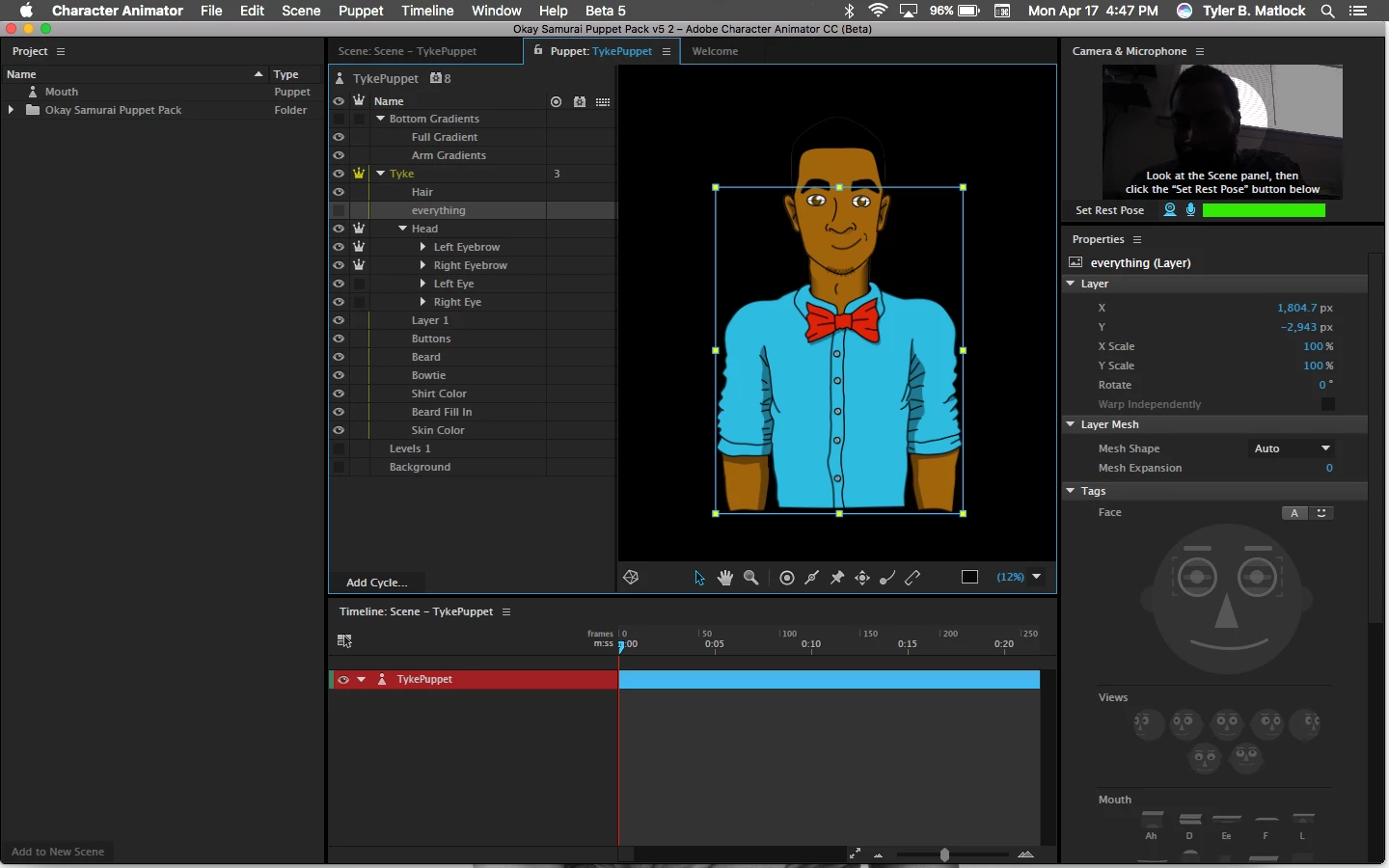
I'm news to Character animator and I'm having trouble with the puppets movements. Whenever I move the puppet/my head, the entire puppet moves. Here's a screenshot of my workspace.
    This topic has been closed for replies.

    2 replies

    TylerBM
    TylerBMAuthor
    Participant
    April 20, 2017

    So I did what you said, followed the template to the "T" and now the head and body all move together whenever I tilt my head. I detached (so I thought) the head from the body and got rid of that background layer of the face. But to no avail, my head doesn't move independently of the body.

    Is there a way I could send you my file and you take a quick look at it?

    oksamurai
    Legend
    April 21, 2017

    Sure - you can share here or DM me your .puppet file (File > Export > Puppet) via a shared link on Google Drive, Dropbox, or Creative Cloud to take a closer look.

    jonnymackjackson
    Known Participant
    April 27, 2017

    Can you post the solution? I'm having the same issue---I had it working fine before the April update and now the body and head are moving together as if it's a ghost character or something

    oksamurai
    Legend
    April 18, 2017

    Hey Tyler, thanks for jumping over here from Facebook - just a lot easier to work with screenshots and the whole community to benefit from seeing any potential solutions.

    The issue seems to be two things:

    1. Your Head is independent. Try turning that off (click the crown next to Head to hide it).

    2. You'll need a little more organization: in your original PSD or AI file, put ALL the head stuff inside the Head group. Then also make a new "Body" group inside your main +Tyke folder and put all body stuff inside there.

    Those two steps should fix it. Basically you always want your characters looking like:

    +Character

         Head

         Body

    And that should have them all move together as one piece. Let me know if that works.

    TylerBM
    TylerBMAuthor
    Participant
    April 18, 2017

    Seems like I didn't separate the body from the head in the original image. Is there a way to take a flat image apart and label it correctly?

    oksamurai
    Legend
    April 18, 2017

    You can use the polygonal lasso tool to essentially cut the body out and re-paste it. A good spot might be where the chin meets the neck.

    But for your setup, it looks like you do have most of the face as separate since it's floating away from everything - if that blank flat brown facial area gets completely covered by the other face art you have, you could just erase the overlapped part and move the remaining shirt/neck into the body.
