


Participant
May 14, 2024
Question

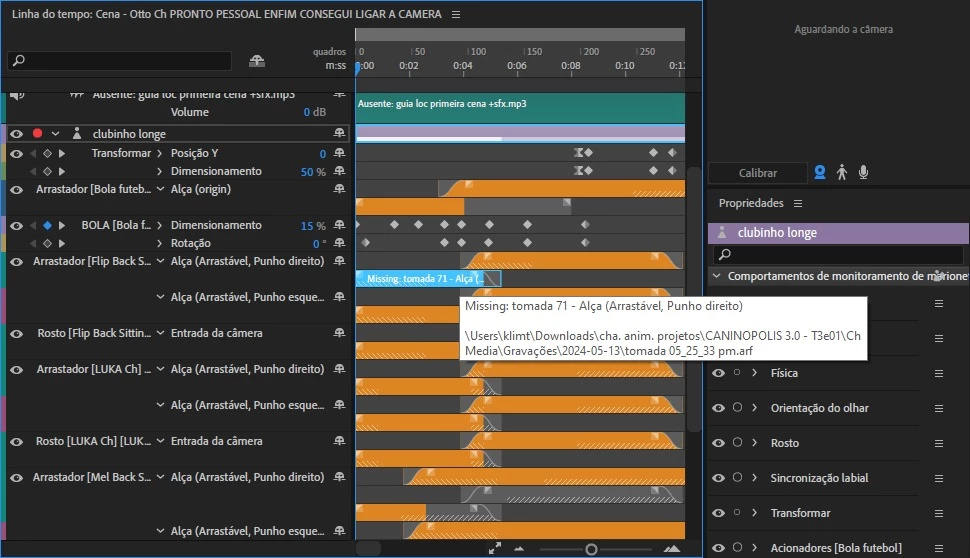
HELP! I tried copying my project folder from one PC to another but the .arf files show as missing

  • May 14, 2024
  • 1 reply
  • 481 views

I am home-office today and i have this huge delivery. So i gathered media and uploaded the Ch. Anim project onto drive, then downloaded on my home PC, all is right, except the animation tracks that don't seem to have any way of re-path. I tried editing the projectdata.rope file but it just corrupted everything. How can i update the path to these .arf files?
This topic has been closed for replies.

1 reply

Community Manager
May 14, 2024

By any chance, was Character Animator running at the time these were being synced? Is this OneDrive or Google Drive or something else? It's possible that the arf files would fail to sync if they were open in a running Ch process at the time. Though I'd expect the same issue with the rope file itself.


I've seen similar issues when people try to make a zip file of an open project and it winds up with a bunch of the files missing (including the rope file that most of the project data besides recording and artwork).