Norvells
Known Participant
June 26, 2024
Answered

Help? Movement Lines

  • June 26, 2024
  • 1 reply
  • 398 views

Hi all!  

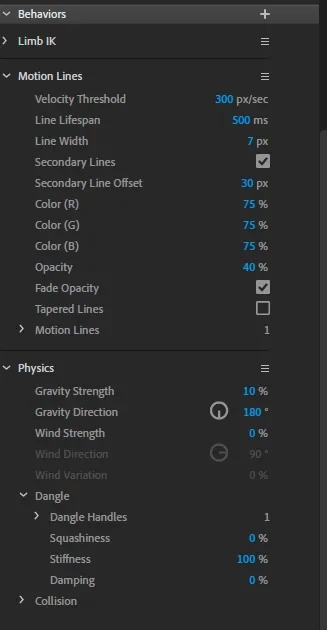
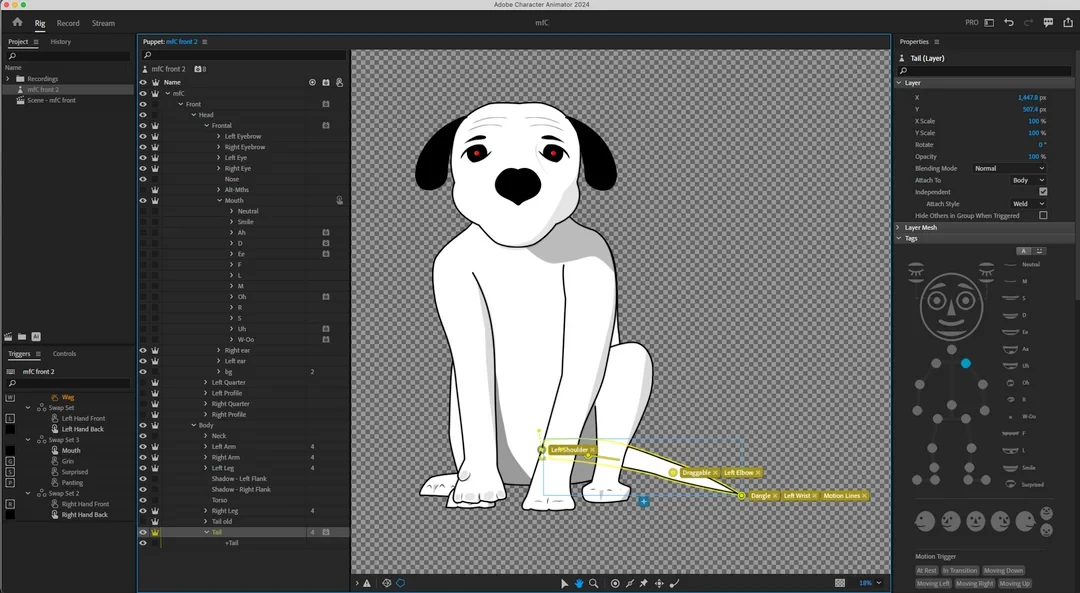
My little pup's tail wag is driving me crazy. Is there a way to hide the movement lines BEHIND the BODY?  The body is a white solid, 100% opacity.   The tail object is placed behind the body, and hides appropriately.   RTFM'd, watched all relevant YT videos but still consider myself an absolute noob, this being my first scratch-made puppet.  Thanks in advance!

mfC


This topic has been closed for replies.
Correct answer k_oshiro

Japanese was converted to English using translation software.

Motion lines are always displayed on top of layers due to specifications.
My solution is to separate the dog body and tail in the recording track and place them in a separate track.
Please try it.
Thanks.

1 reply

k_oshiro
Community Expert
k_oshiroCommunity ExpertCorrect answer
Community Expert
June 26, 2024

Japanese was converted to English using translation software.

Motion lines are always displayed on top of layers due to specifications.
My solution is to separate the dog body and tail in the recording track and place them in a separate track.
Please try it.
Thanks.

k_oshiro(AdobeCommunityExpert)
Norvells
NorvellsAuthor
Known Participant
June 27, 2024

oh wow!  Great idea -I'll give it a shot.  Thank you!