December 23, 2022
Answered

Help Please!!!

  • December 23, 2022
  • 2 replies
  • 399 views

hello friends, I made all the adjustments, but my character's head is distorted and I couldn't fix it. Is there anyone who can help with this? I am also attaching the project file. https://we.tl/t-OkJRwSTLOL 

This topic has been closed for replies.
Correct answer k_oshiro

I translated Japanese into English using software.


Thank you for resending your project file.

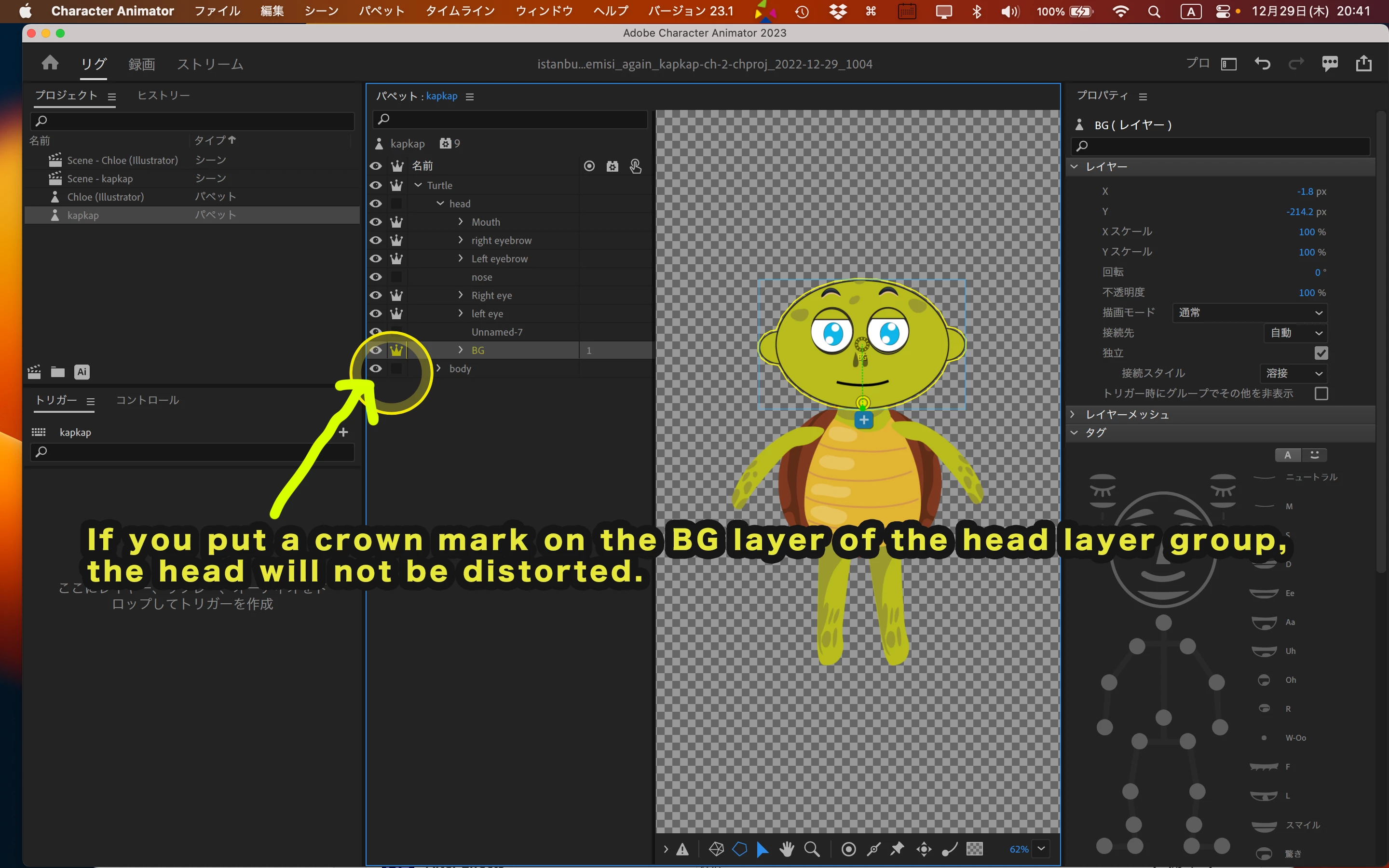
If you put a crown mark on the BG layer of the head layer group, the head will not be distorted.
Thank you

GoogleDrive

https://drive.google.com/file/d/1X3v_8_d-V_TZm22ujBBHteHWRFxw4TJh/view?usp=share_link

YouTube Japanese

https://youtu.be/4LDIT4lMGf4

2 replies

k_oshiro
Community Expert
k_oshiroCommunity ExpertCorrect answer
Community Expert
December 29, 2022

I translated Japanese into English using software.


Thank you for resending your project file.

If you put a crown mark on the BG layer of the head layer group, the head will not be distorted.
Thank you

GoogleDrive

https://drive.google.com/file/d/1X3v_8_d-V_TZm22ujBBHteHWRFxw4TJh/view?usp=share_link

YouTube Japanese

https://youtu.be/4LDIT4lMGf4

k_oshiro(AdobeCommunityExpert)
January 3, 2023

Mr Oshiro,

Thank you for your help,

Greetings from Turkey,

I wish you healthy days..

k_oshiro
Community Expert
Community Expert
December 25, 2022

Translated Japanese to English by software.

I downloaded your project but the link was broken. It is a color bar.

Please select File→Copy media files to your project.

Then upload it again.

k_oshiro(AdobeCommunityExpert)
December 29, 2022

Hello, it is very interesting to see the project as a color bar, thank you for your help, greetings from turkey.. https://we.tl/t-rih0u2qRSC