

paulb27964210
Known Participant
April 21, 2020
Answered

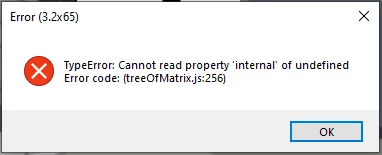
HELP - TypeError: Cannot read property 'internal' of undefined Error code: (treeOfMatrix.js:256)

  • April 21, 2020
  • 2 replies
  • 2313 views

Hi!


I'm recieving this error code that stops the "record" screen from updating in real-time. It hasn't crashed the program, but it did stop it from saving properly initially. It happens whenever I select a new layer, it's non-destructive, but it does get in the way, and will stop me from being productive.

If anyone understands this error please help!


-Paul
This topic has been closed for replies.
Correct answer alank99101739

There used to be a bug that caused javascript errors due to handles not being inside the artwork layer the handle was on. It was a bug in the puppet, but it caused the software to fail at times. It might be another similar bug? That is some uncommon strange thing in the puppet causing the application to crash.


Suggestion: export puppet to a file, import it, see if copy still has bug. If yes, delete half the puppet - still see the error? Undo and delete the other half of the puppet. Still an error? I often do that to spot parts of a puppet with strange tags or handles i did not notice. But i normally do to a copy of the puppet in case i break the original puppet by accident!!

2 replies

alank99101739
alank99101739Correct answer
Legend
April 21, 2020

There used to be a bug that caused javascript errors due to handles not being inside the artwork layer the handle was on. It was a bug in the puppet, but it caused the software to fail at times. It might be another similar bug? That is some uncommon strange thing in the puppet causing the application to crash.


Suggestion: export puppet to a file, import it, see if copy still has bug. If yes, delete half the puppet - still see the error? Undo and delete the other half of the puppet. Still an error? I often do that to spot parts of a puppet with strange tags or handles i did not notice. But i normally do to a copy of the puppet in case i break the original puppet by accident!!

paulb27964210
Known Participant
May 6, 2020

Gah! Thank you!
I stuck with versioning down, but this is something that's going to help with an error I'm revieving now. I don't know why I didn't see an email with your reply, but I really, really appreciate your help, dude!

paulb27964210
Known Participant
April 21, 2020

Update:
Uninstalling, re-installing the previous version, and then restarting had fixed the issue, but I'm still interested if anyone has insight into how this would be resolved otherwise