
christineavatar
Legend
June 21, 2020
Answered

Her eyes won't open

  • June 21, 2020
  • 3 replies
  • 352 views

I built my puppet in Illustrator. I have been fooling around for days. I cannot get her eyes to open. I've run out of things to try.
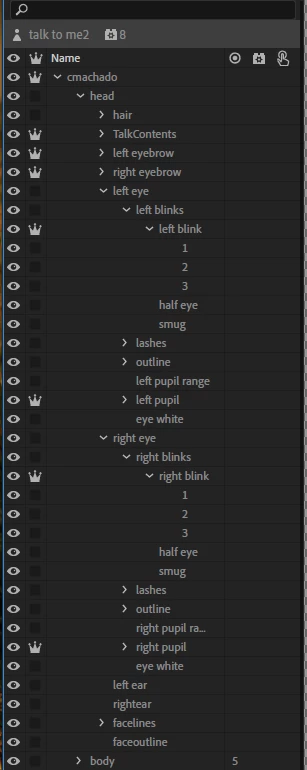
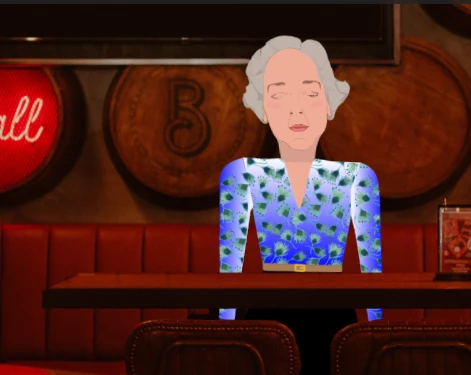
 Any ideas?

This topic has been closed for replies.
Correct answer Platty Puss

I noticed that in the layers you had Pupil Range ahead of the Pupil. If Pupil Range has any color in it, it would hide the pupils.

3 replies

christineavatar
Legend
June 21, 2020

I threw out everything (in Illustrator) but the bare necessities and the eyes finally showed up when they were supposed to. I guess I'll have to add in the extras a different way. Thank you so much for responding. Your analysis really helped me 'cut to the chase'.

Platty Puss
Platty PussCorrect answer
Inspiring
June 22, 2020

I noticed that in the layers you had Pupil Range ahead of the Pupil. If Pupil Range has any color in it, it would hide the pupils.

alank99101739
Legend
June 21, 2020

Oh, just noticed left blink is inside left blinks inside left eye. I think the blink layer must be an immediate child of left eye. It hides all the siblings - I don't think you can nest it deeper

alank99101739
Legend
June 21, 2020

Try hiding the blink layer (turn off eyeball icon).


Then make sure the behavior controlling blink (do you use autoblink?) has found that layer. Look in behavior in properties panel, then look in handles sections (try rue gaze and face behavior too - I don't remember which it is in). If you see blink with 0 next to it, there is a tagging problem. The behavior did not find the layer to control