
Participant
July 21, 2018
Answered

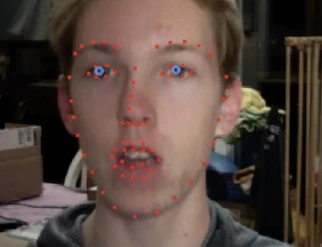
Hide webcam/show only facial tracking?
  • July 21, 2018
  • 1 reply
  • 767 views

Hello, I am trying to figure out a way to only show the facial tracking wireframe for streaming/recording (the red dots + blue eyes). Basically hide the webcam and only show the facial tracking dots. Does anyone know a way to do this?

Thank you!

    This topic has been closed for replies.
    Correct answer alank99101739

    Not quite what you asked, but I turned on the web cam, clicked the three horizontal lines next to the title to bring up the menu, undocked that panel, the closed the separate window. The webcam is still working, but its no longer visible (no dots, no face, nothing - but webcam is still controlling puppet.  I then brought it back using the Window menu (selecting "camera & microphone") to bring it back. (Then had to drag title bar to dock the panel again.)

    I don't know of a way to show only the dots without the face while streaming. I have not heard of anyone managing to do that.

    1 reply

    alank99101739
    alank99101739Correct answer
    Legend
    July 22, 2018

    Not quite what you asked, but I turned on the web cam, clicked the three horizontal lines next to the title to bring up the menu, undocked that panel, the closed the separate window. The webcam is still working, but its no longer visible (no dots, no face, nothing - but webcam is still controlling puppet.  I then brought it back using the Window menu (selecting "camera & microphone") to bring it back. (Then had to drag title bar to dock the panel again.)

    I don't know of a way to show only the dots without the face while streaming. I have not heard of anyone managing to do that.

    Participant
    July 23, 2018

    That is useful, thanks Alan. However I was hoping there was a way to hide the webcam and only show the facial tracking features. If this is not possible, it would be an extremely useful feature to have in both the webcam preview and recording/streaming previews.

    alank99101739
    Legend
    July 23, 2018

    If nobody comes back with a solution, if you look at the top of the page in the forums there is a separate area for “feature requests”. That helps them get voted for and helps Adobe spot feature ideas (they might miss general forum posts). They have webcam on/off so, as someone who does not have to write the code, it does not sound hard to have a third mode (webcam off, webcam on, webcam dots only without video). Including reasons why you would find it useful could help - I bet they have a long feature request list, so everything you can do to motivate why a feature should be added helps! ;-)